Streamer.bot doesn't run on your Mac. Kloot runs in your browser.
Streamer.bot is the best free automation tool a Windows streamer can install — and its own docs list macOS as "experimental and not officially supported". Kloot gives you the part most people wanted it for — a death counter, a deck you press, an overlay in OBS — as a web page. Nothing to install, on any machine.
Already on Streamer.bot? Add Kloot next to itCompetitor facts verified October 2026. We keep this page current.
Is there a Streamer.bot alternative for Mac?
Streamer.bot is a Windows application; on macOS it runs only through the Whisky compatibility layer and is unsupported. Kloot is a browser-based alternative for the overlay side: a death counter, text, reactions and screens you fire from a deck on your laptop or phone, drawn into OBS through one browser source. It does not replace Streamer.bot's chat automation. Free, no download; Pro is $9/mo or $79/yr.
What Streamer.bot is, honestly
Streamer.bot is a free Windows app that listens to Twitch, YouTube and Kick events and runs "actions" you build: change an OBS scene when a raid lands, play a sound on a sub, bump a counter when a mod types a command. It's powerful because it's a toolkit. That's also the catch: a death counter in Streamer.bot is an action you write, a text source you point it at, an OBS WebSocket you configure, and a trigger you choose — a hotkey, a chat command, or a Stream Deck button. The popular community counters add OBS plugins and fonts on top.
On a Mac, none of that starts: Streamer.bot's documentation says macOS support is experimental and not official, and the only route is a Wine wrapper.
A Streamer.bot counter 6 links
- Windows
- Streamer.bot
- OBS WebSocket
- An action you write
- A text source
- A trigger (hotkey / chat / Stream Deck)
Kloot 3 links
- A browser tab
- One URL
- OBS
Where Kloot fits
Kloot is the other half of the job: what viewers see and what you press. It runs in a browser tab on Windows, macOS, Linux or a Chromebook. You paste one URL into OBS as a browser source, and every tool you add — counter, text, reactions, lower thirds, screens, polls, giveaways — draws through it. You press keys on a deck in your browser or on your phone. Nothing is installed, nothing is built.
If you came to Streamer.bot for a death counter: Kloot's takes two minutes, median, from signup to first bump, measured across the streamers who arrived from counter searches last month.
Runs where you are
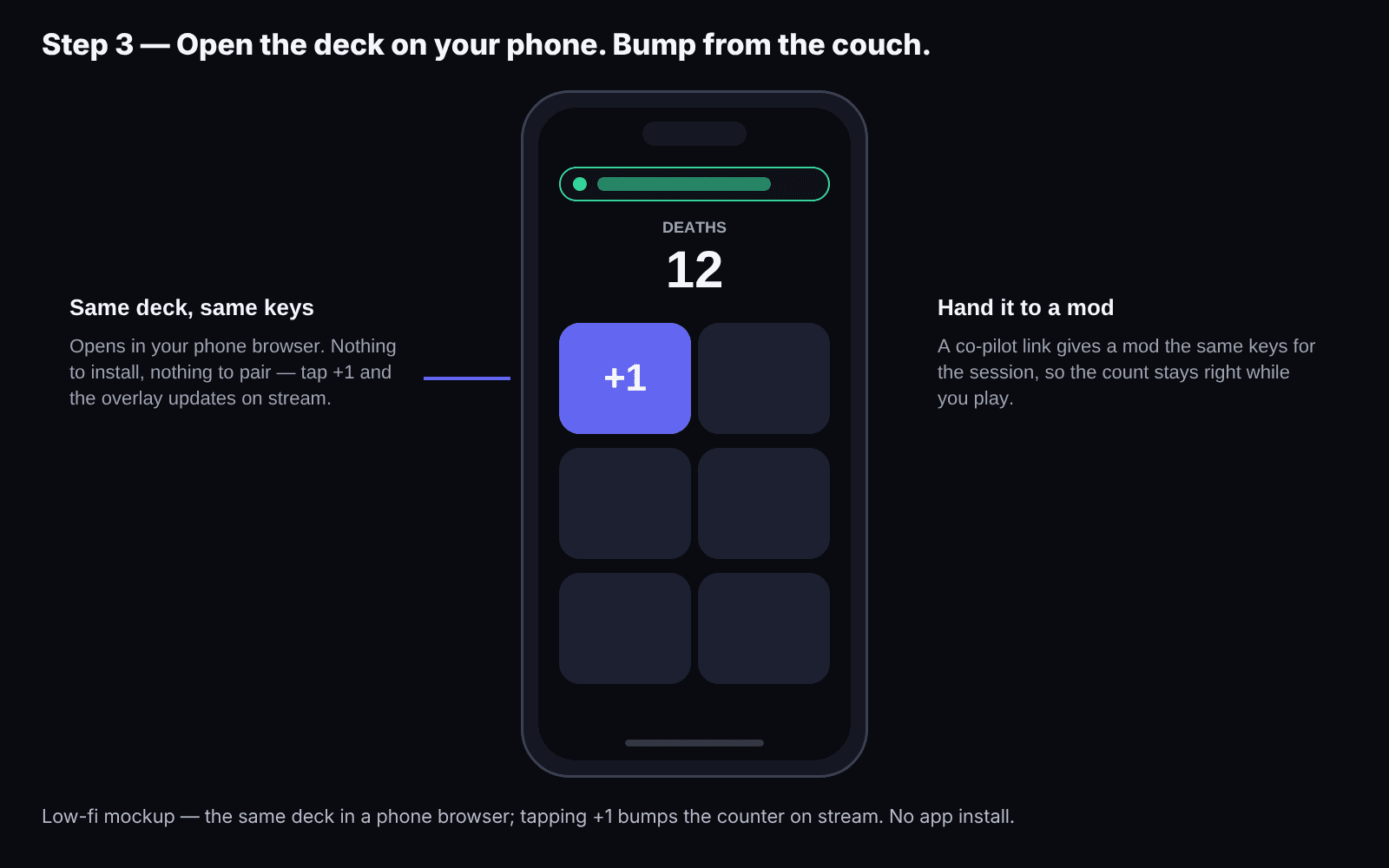
Browser tab, any OS. The deck works on your phone, so the game stays fullscreen while you bump.
Nothing to build
A counter is a key on the deck, not an action, a text source and a WebSocket. Two minutes to first bump, measured.
One light browser source
Every tool shares one source; the overlay loads only what you use. No plugins, no fonts, no launcher process.
Kloot vs Streamer.bot
Where Kloot pulls ahead — and where Streamer.bot does.
Runs on macOS / Linux / Chromebook
Streamer.bot docs: macOS "experimental and not officially supported".
Install required
Death counter, first bump
Community counters add OBS plugins and a font.
Bump from your phone
One browser source for every tool
Visual presets (skins, milestones)
Works with a Stream Deck
Chat commands (!death)
Streamer.bot's core strength.
Twitch / YouTube / Kick event automation (subs, raids, redemptions)
Kloot never reads chat or platform events.
OBS scene switching and automation
Price
Streamer.bot is free software with a community; some add-ons are paid.
full · partial · not offered
Try it — press +1
The real counter renderer on a game frame — the same one that draws on your stream.
Pro is $9/mo or $79/yr.
Pricing, side by side
Different models — here’s the honest version of both.
Kloot
- $0FreeEnough to run a real stream, free forever: 2 screens with a countdown, 1 live counter, emoji effects and presets, one each of alert, lower third, text overlay, ticker and border, and 2 giveaways plus 2 polls every month. Kloot badge on overlays.
- $9/moProMore of everything, plus every Pro feature: 10 screens with overtime, moving backgrounds and band & camera layouts; 10 counters with 100+ looks, segments and milestones; Pro counter looks that react to your run; every alert, lower third, ticker and border you build live at once; unlimited giveaways and polls with automatic prize delivery by email and up to 5 prizes a draw; sponsor ad overlays and custom border uploads; and no Kloot badge.
- $79/yr ($6.58/mo, billed yearly)Pro (annual)Everything in Pro, billed once a year instead of monthly — the best-value way to run Kloot.
- $5 / 48 hoursEvent Pass48 hours of everything in Pro, one payment and no subscription. The way to try Kloot on a real stream: charity streams, tournaments and product launches.
Streamer.bot
Free.
Streamer.bot itself is free. Counters and overlays for it are community add-ons: some free, some £5–$18; most need extra OBS plugins.
Keep Streamer.bot if you have it
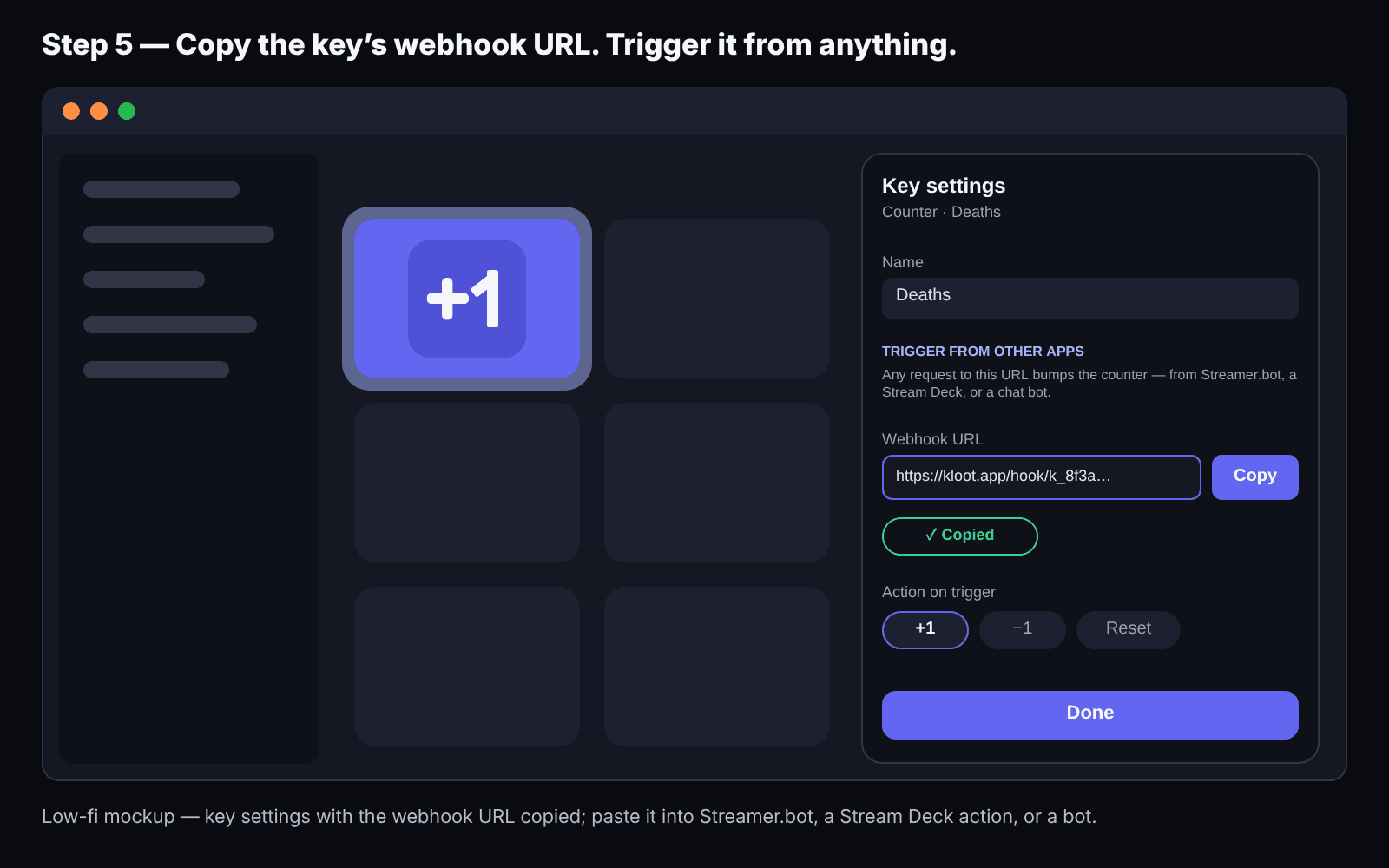
If you already run Streamer.bot on Windows with the triggers you want, keep it. Kloot sits next to it: on Pro, every key on your deck has a webhook URL, so a Streamer.bot action (or a Stream Deck button, or Firebot, or Mix It Up) can press it — bump the Kloot counter, show a screen — and you keep your automation and your overlay on one source.
Switch in five steps
Sign up on any machine.
The counter is already on your deck.
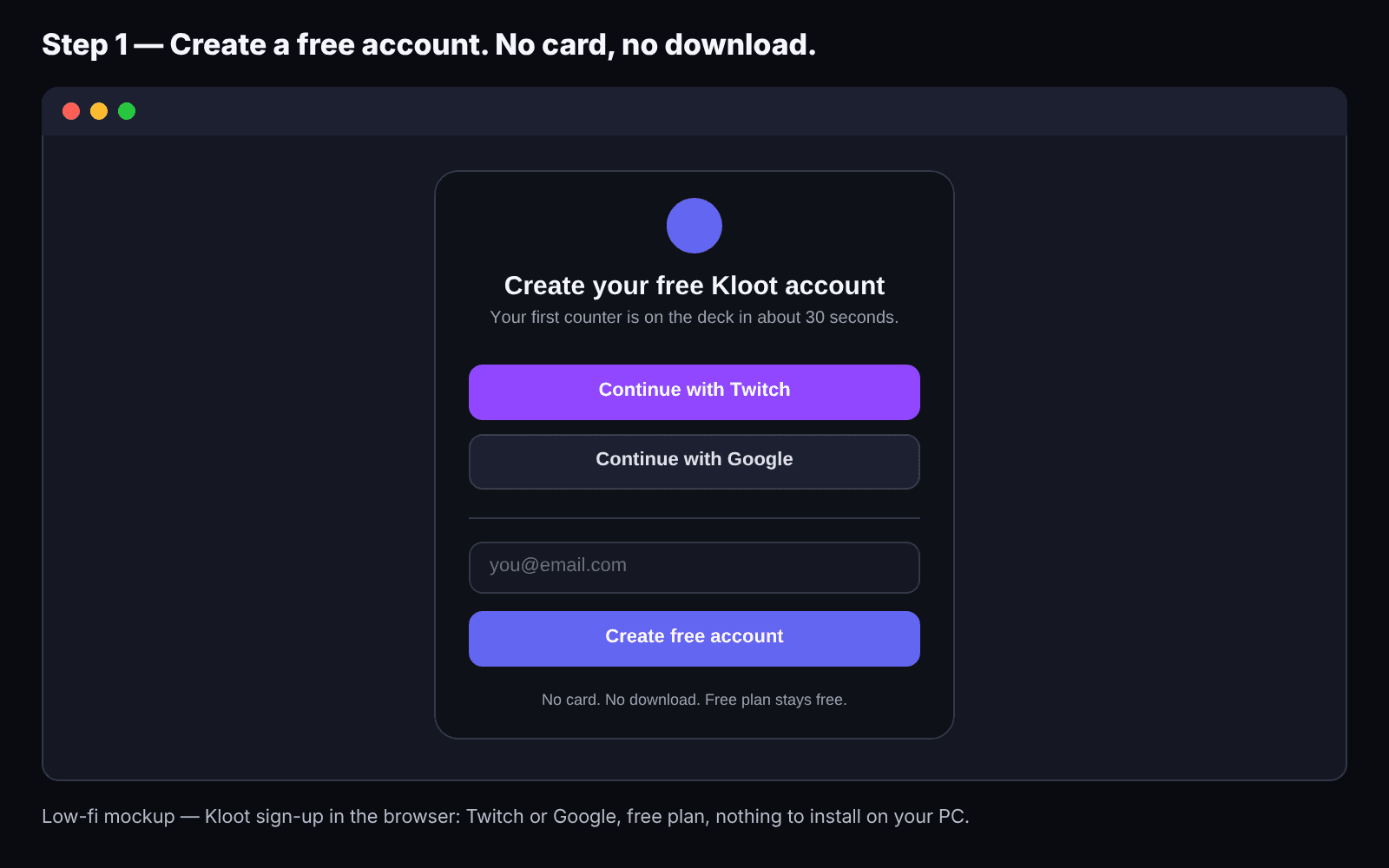
Paste one URL into OBS.
Sources → Browser → paste → 1920×1080.
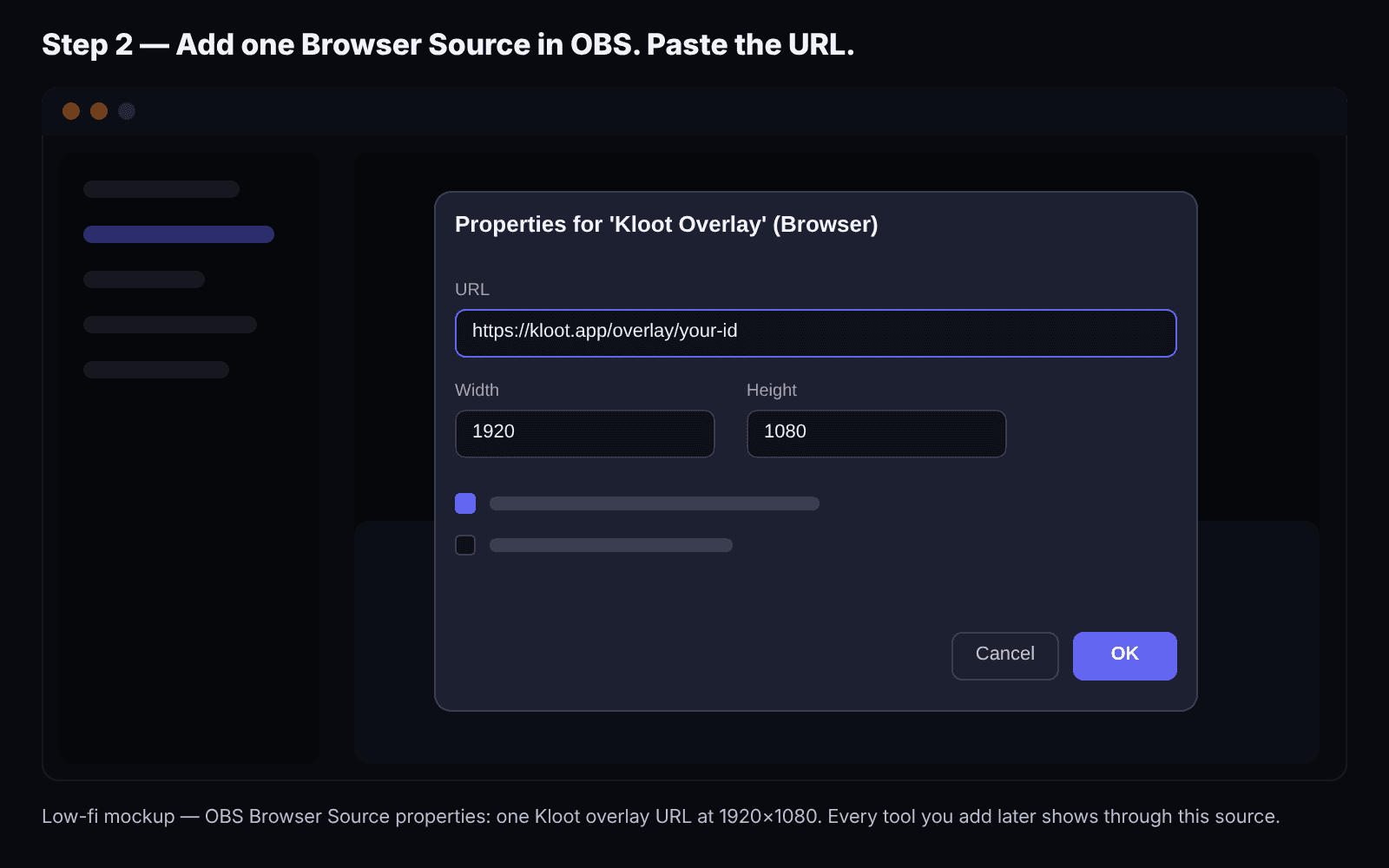
Press +1 and watch the preview.
Decrement and reset are on the same key's menu.
Open the deck on your phone.
Same link; the game stays fullscreen.
Optional: wire Streamer.bot or a Stream Deck to it.
Copy the key's webhook URL into an action. (Pro.)
Kloot is for you if:
- you're on a Mac, Linux or a Chromebook
- you want a counter, deck and overlay tonight
- you'd rather press a key than build an action
- you want to bump from your phone
Streamer.bot is for you if:
- you're on Windows
- you want chat commands and channel-point redemptions
- you want raid/sub automation or OBS scene switching
- you want anything that fires without you pressing it — Kloot never reads your chat and never automates OBS
Frequently asked
Does Streamer.bot work on Mac?
Not officially. Streamer.bot's documentation describes macOS support as experimental and unsupported, and points to the Whisky compatibility layer. Some streamers run it in a Windows VM. Kloot runs natively in any browser.
Is Kloot a Streamer.bot replacement?
No. Streamer.bot automates chat and platform events; Kloot is what you press and what viewers see. Many streamers run both, with Streamer.bot bumping Kloot through a webhook.
Can Kloot react to chat commands like !death?
Not today. Kloot is manual-fire by design: you, or your phone, change the number — and on Pro, a mod you share your deck with can bump it from their own Kloot panel.
Is Kloot free?
Yes. The Free plan has one counter, text, reactions, screens, lower thirds, polls, giveaways, phone control and the overlay, with no time limit and no card. Pro is $9/mo or $79/yr ($49/yr for the first 250 members).
Does it work on Linux or a Chromebook?
Yes — anything with a browser for the deck and OBS for the overlay. Streamer.bot has a Linux build; Kloot needs none.
Will my Streamer.bot counter history carry over?
No — you'll set your starting number by hand in the counter editor. Per-game segments and lifetime totals live on Pro.
All Streamer.bot details verified October 2026 and reviewed regularly. Spot something out of date? Tell us and we’ll fix it.
See the tools switchers move first:
Works alongside everything you already use


Your counter is one browser tab away.
Free plan, no card, nothing to install. Pro is $9/mo or $79/yr — $49/yr for the first 250 members — when you want segments, skins, milestones and the webhook.
Free forever · Pro $9/month or $79/year · Event Pass $5 for 48 hours · Prices + applicable taxes