Soulslike stream overlays for OBS

Count every death without leaving the fight.

A Soulslike run is told in deaths. Bump the counter from your deck or your phone, start a new count at every boss, and let a ribbon mark the milestones. You press every one: nothing reads the game.

Try it in a browser — Free

Joined by streamers from 60+ countries. Try it with no account and no download.

Your deck · your stream

These are the real deck keys and the real overlays. Press one.

countries
60+

countries

counter bumps and key presses
12,000+

counter bumps and key presses

hours streamed with Kloot
500+

hours streamed with Kloot

What overlays does a Soulslike stream need?

A death counter you can bump without leaving the fight, a separate count and personal best for each boss, and something that marks the big numbers. In Kloot you press +1 when you die and Next boss when you reach a new one, and a ribbon plays at every fifth death. Nothing reads the game.

One run, start to finish

Run a whole boss night from one deck

You press Starting Soon. A Starting Soon card with a countdown.

Run of show

Built for Soulslike streams

Set it up once, press it every run

How do I add a death counter to my stream?

Make a counter labelled Deaths and pin its +1 key to your deck. Press it when you die, from your deck or from your phone.

  • Your deck opens in your phone’s browser, so the game stays fullscreen.
  • −1 takes back a misclick, and Reset starts a new run.
  • Free includes one counter.
Counters · FreeSee Counters

In your panel

On your stream

How do I count deaths per boss, with a personal best?

Turn on segments for the counter. Press Next boss when you reach one: a boss card slides in, the count starts again for that fight, and its personal best sits underneath.

  • Tonight’s total and your all-time count carry on across bosses.
  • You start every segment yourself; nothing reads the game.
  • On Creator.

In your panel

On your stream

How do I mark the big numbers?

Give the counter a milestone ladder: every 5 deaths, plus numbers you choose. A ribbon runs along the bottom edge each time you cross one.

  • It plays once per run, so fixing a misclick never replays it.
  • It runs along the frame edge, never over the fight.
  • On Creator.

In your panel

On your stream

Two minutes

How do I add Soulslike stream overlays to OBS?

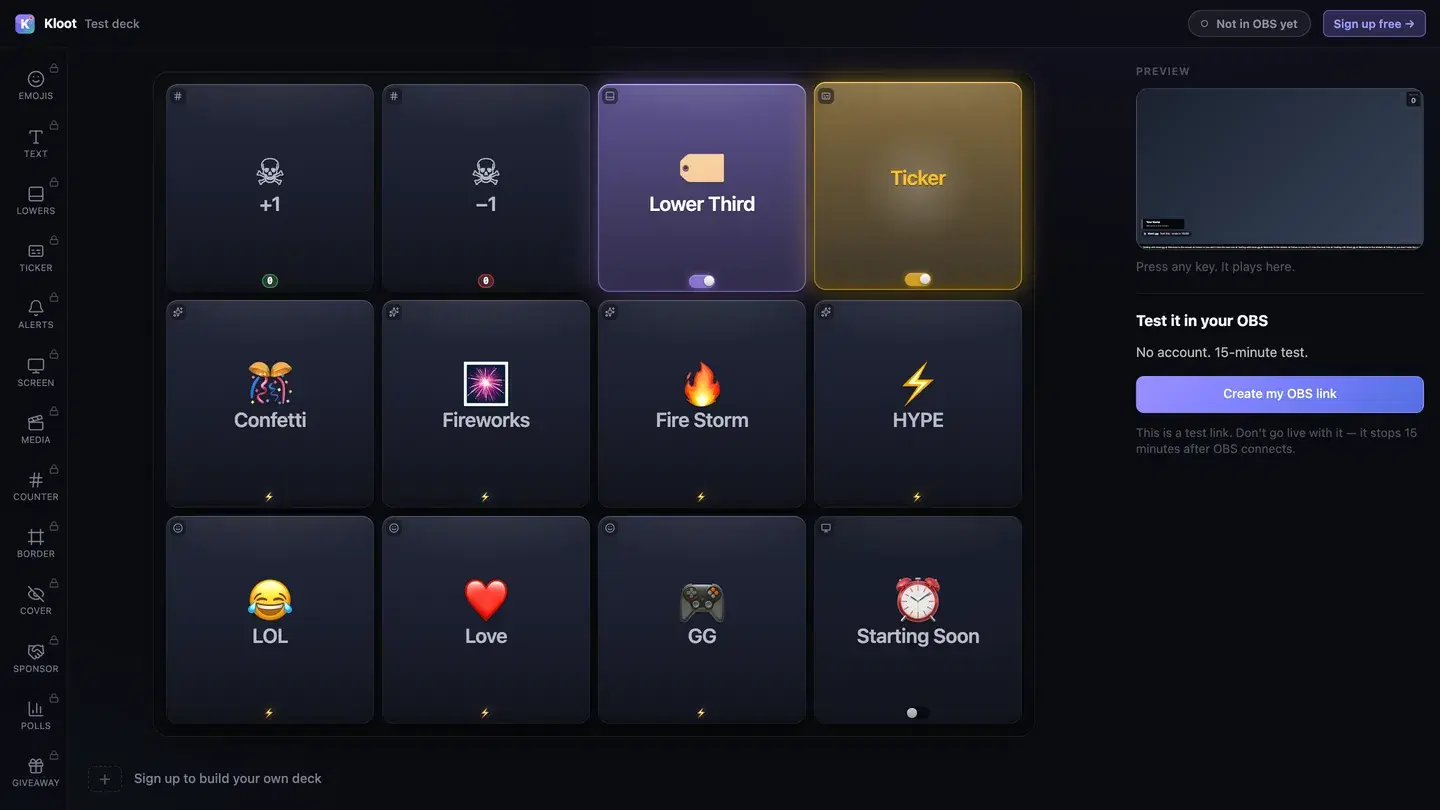
The Kloot test deck at /try: twelve keys in the middle, with Lower Third and Ticker switched on, a live preview of the stream on the right and a button that makes a link for OBS.
The free test deck at kloot.gg/try, exactly as it looks. Your own deck holds the keys you choose.

OBS · Browser source

URLhttps://kloot.gg/overlay/u/your-linkWidth1920Height1080
  1. 1

    Open the deck

    Open your deck in a browser. You can try it with no account.

  2. 2

    Add one Browser source

    In OBS, add a Browser source, paste your Kloot overlay link, and set it to 1920 × 1080.

  3. 3

    Press keys

    Press keys from the deck on your PC or your phone. Each one goes straight to your stream.

Hands free of OBS

Can I run it from my phone?

Yes. Your deck opens in your phone’s browser, so OBS, your guests and the conversation stay where they are. Nothing to install.

Control your stream from your phone

Your phone is the deck

KKloot LIVE
Full panel layout · auto-switches

Your stream reacts

LIVE👁 1,248
Poll opened

What should we play next?

Valorant
4242%
42%
Fortnite
3131%
31%
CS2
2727%
27%
Scan to vote
KLOOT
kloot.gg/join
The real overlay renderers — exactly what lands in your OBS

Screens library

Templates for Soulslike streams

🪨 AshenFree

Grey ash over cold stone.

Use this template
🔥 Dungeon EmbersCreator

Embers rising out of the dark.

Suits ambient drone: add your own track

Use this template
⛪ CathedralCreator

A shaft of light down a dark nave.

Suits choral drone: add your own track

Use this template
☠️ Poison SwampCreator

Green fog sitting over dark water.

Use this template

Ways to run it

What does a Soulslike stream setup look like?

Example setup

A first blind playthrough

One game, start to finish, over many nights.

  • Death +1
  • Next boss
  • HYPE

Next boss at every new fight, so the boss card tells a late viewer where the run is.

Runs on Creator

Example setup

A counter a mod runs

A streamer who never takes their hands off the controller.

  • Death +1
  • Next boss

A mod with a co-pilot link presses +1 from their own phone, signed in to their own account.

Runs on Creator

Plans

What does this setup cost?

Free

$0

forever

Covers

  • Starting Soon screen
  • death counter
  • HYPE pop
  • ending card

Creator

$15/mo

or $8.25/mo billed yearly at $99

Adds

  • per-boss count with a personal best
  • milestone ribbon

Everything on this page runs on Creator. See full pricing

Without Kloot

Kloot vs. doing it by hand in OBS

JobBy handWith Kloot
Counting deathsA text source you edit, or a hotkey pluginA +1 key on your deck or your phone
Deaths per bossA spreadsheet, or nothing at allNext boss starts a new count with its own best
The big numbersNothing on screenA ribbon at every milestone
A mod helpingSharing your OBS remote passwordA co-pilot link they open on their own phone
In OBSA source for every widgetOne Browser source for all of it

What Kloot doesn’t do

It never reads your chat, never switches your OBS scenes, and doesn’t detect anything on its own. Every change on screen is a key you, or someone you gave a link to, pressed.

Works alongside the tools you already stream with

OBS StudioStreamlabsTwitchYouTubeKick

Questions

How do I add a death counter to OBS?

Make a counter labelled Deaths, add your Kloot overlay link to OBS as a Browser source, and press +1 when you die. Free includes one counter.

Does it count deaths automatically?

No. You, or someone you give a co-pilot link to, press +1. Nothing reads the game, so it works the same in every Soulslike.

Can I count deaths per boss?

Yes, on Creator. Press Next boss when you reach a new one: the count starts again for that fight, with its personal best, while tonight’s total carries on.

Death counter per boss, with a personal best

Can a mod count my deaths for me?

Yes, on Creator. Give them a co-pilot link: they sign in once with Google or Twitch and can press +1 and −1 from their own phone. They cannot reset it, and you can revoke the link at any time.

Let a mod run your death counter

Can I bump it from a Stream Deck?

Yes, on Creator. Each key has a private link that a Stream Deck Website action or a Streamer.bot Fetch URL can press.

Bump a counter from Stream Deck or Streamer.bot

Is there a death counter for my game?

Yes. There are death counter pages for Elden Ring, Dark Souls III, Bloodborne, Sekiro and Lies of P, and the same counter works for any game.

Does it work with Streamlabs as well as OBS?

Yes. Everything on this page is one overlay link. Add it as a Browser source at 1920 × 1080 in OBS or in Streamlabs Desktop.

Which plan do I need?

Free covers the Starting Soon screen, death counter, HYPE pop and ending card. Creator ($15/mo) adds the per-boss count with a personal best and milestone ribbon.

90 seconds from now,
confetti hits your stream.

Sign in → paste one URL → press a button. That’s it. Your viewers will notice the difference tonight.

Free forever · Creator $99/yr or $15/mo · Pro $149/yr or $25/mo · Event Pass $9 for 3 days