Charity stream overlays for OBS

The total on screen, and every goal celebrated.

A charity stream runs on momentum. Press +$5 as pledges come in, fire confetti when you pass a goal, and put a giveaway QR on your break screen. Kloot does not read your donation platform: the total is the one you press.

Joined by streamers from 60+ countries. Try it with no account and no download.

Your deck · your stream

These are the real deck keys and the real overlays. Press one.

countries
60+

countries

counter bumps and key presses
12,000+

counter bumps and key presses

hours streamed with Kloot
500+

hours streamed with Kloot

What overlays does a charity stream need?

A running total viewers can see, a moment for every goal, a break screen that keeps people engaged, and a clock for the final stretch. In Kloot the total is a counter shown as money, which you raise with a key; it does not connect to a donation platform.

One event, start to finish

Run a whole charity event from one deck

You press Starting Soon. A Starting Soon card with a countdown.

Run of show

Built for charity streams

Set it up once, press it every event

How do I show the amount raised on stream?

Make a counter and show it as money, $5 a press with the symbol before the number. Press +$5 as each pledge comes in.

  • It is a display format: you set the rate, and the counter shows the total.
  • It does not connect to a donation platform. You, or a helper you share your deck with, press it.
  • On Pro, or with the Event Pass.

In your panel

On your stream

How do I put a giveaway QR on my break screen?

Start a giveaway, then add the giveaway QR block to your break screen. Viewers scan it to enter, and the entry count updates while you are away.

  • Blocks sit beside the heading and clock in the Full, Card and Cam window layouts.
  • A block with nothing in it hides itself, so the QR only shows while a giveaway runs.
  • On Pro.

In your panel

On your stream

How do I count down the final hour?

Make a screen in the Card layout with a one-hour countdown. The card covers the middle of the frame, and the stream still shows around it.

  • Set the length once; one key starts it.
  • At zero it can hide itself or stay up.
  • Free includes it.
Screens · FreeSee Screens

In your panel

On your stream

Two minutes

How do I add charity stream overlays to OBS?

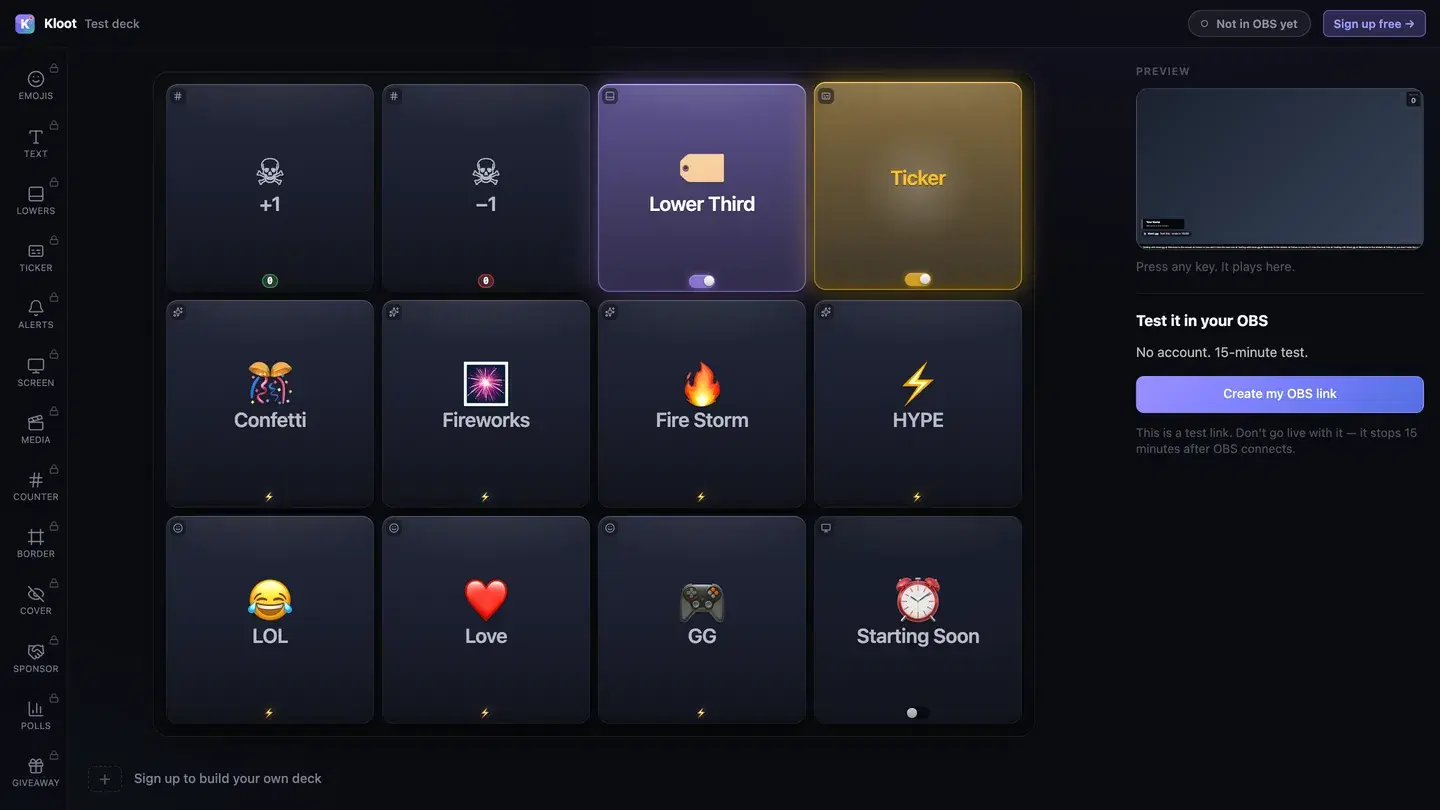
The Kloot test deck at /try: twelve keys in the middle, with Lower Third and Ticker switched on, a live preview of the stream on the right and a button that makes a link for OBS.
The free test deck at kloot.gg/try, exactly as it looks. Your own deck holds the keys you choose.

OBS · Browser source

URLhttps://kloot.gg/overlay/u/your-linkWidth1920Height1080
  1. 1

    Open the deck

    Open your deck in a browser. You can try it with no account.

  2. 2

    Add one Browser source

    In OBS, add a Browser source, paste your Kloot overlay link, and set it to 1920 × 1080.

  3. 3

    Press keys

    Press keys from the deck on your PC or your phone. Each one goes straight to your stream.

Hands free of OBS

Can I run it from my phone?

Yes. Your deck opens in your phone’s browser, so OBS, your guests and the conversation stay where they are. Nothing to install.

Control your stream from your phone

Your phone is the deck

KKloot LIVE
Full panel layout · auto-switches

Your stream reacts

LIVE👁 1,248
Poll opened

What should we play next?

Valorant
4242%
42%
Fortnite
3131%
31%
CS2
2727%
27%
Scan to vote
KLOOT
kloot.gg/join
The real overlay renderers — exactly what lands in your OBS

Screens library

Templates for charity streams

🎟️ TicketFree

Ticket-stub black and gold.

Use this template
🏆 Stadium WallPro

Big numerals and a beam across the crowd.

Suits hype loop: add your own track

Use this template
🌹 Red CarpetPro

Sparks over a deep red stage.

Suits hype loop: add your own track

Use this template
📊 Big BoardPro

A board of amber lines running back.

Use this template

Ways to run it

What does a charity stream setup look like?

Example setup

A 12-hour charity marathon

One streamer, a long day, a fundraising target.

  • +$5
  • Confetti
  • Break + QR
  • Final hour

A helper presses +$5 from their own Kloot panel as pledges come in, so the streamer never stops to count.

Runs on Pro

Example setup

A one-evening fundraiser

Three hours, one cause.

  • Starting Soon
  • +$5
  • Confetti
  • Ending card

The Event Pass covers it: everything in Pro for the weekend, one payment.

Runs on Pro

Plans

What does this setup cost?

Free

$0

forever

Covers

  • Starting Soon screen
  • confetti burst
  • countdown to the end
  • ending card

Pro

$9/mo

or $79/yr

Adds

  • money total
  • break screen with a giveaway QR

Event Pass · $5 · 48 hours of everything in Pro

Built for a one-off event like this one. One payment, no subscription.

See the Event Pass →

Everything on this page runs on Pro. See full pricing

Without Kloot

Kloot vs. doing it by hand in OBS

JobBy handWith Kloot
The totalA text source you retype after every pledgeA money counter: +$5 with one key
A goal metA video you queue up in a sceneOne Confetti key
The breakA still image with a QR code you made yourselfA break screen with a live giveaway QR and its entry count
The final hourA countdown website captured as a windowA countdown card you start with one key
Paying for itA monthly plan for one weekendAn Event Pass: $5 for 48 hours of everything in Pro

What Kloot doesn’t do

It never reads your chat, never switches your OBS scenes, and doesn’t detect anything on its own. Every change on screen is a key you, or someone you gave a link to, pressed.

Works alongside the tools you already stream with

OBS StudioStreamlabsTwitchYouTubeKick

Questions

How do I show donations on a charity stream?

Make a counter shown as money and press +$5, or your own amount, as pledges come in. Kloot does not connect to a donation platform, so the total on screen is the one you press. Money display is on Pro and the Event Pass.

Set up overlays for a charity stream

Can I put a price on every death for charity?

Yes. A death counter can show its count as money, $1 or $5 a death, so viewers see what the run has raised.

Charity death counter: money per death

How do I run a giveaway during a charity stream?

Start a giveaway and put its QR on your break screen, so people can enter while you are away. Giveaways are on every plan; the QR block on a screen is Pro.

Giveaway QR on your break screen

What is the Event Pass?

48 hours of everything in Pro for one payment of $5, with no subscription. It suits a charity weekend.

Does it work with Streamlabs as well as OBS?

Yes. Everything on this page is one overlay link. Add it as a Browser source at 1920 × 1080 in OBS or in Streamlabs Desktop.

Which plan do I need?

Free covers the Starting Soon screen, confetti burst, countdown to the end and ending card. Pro ($9/mo or $79/yr) adds the money total and break screen with a giveaway QR.

90 seconds from now,
confetti hits your stream.

Sign in → paste one URL → press a button. That’s it. Your viewers will notice the difference tonight.

Free forever · Pro $9/month or $79/year · Event Pass $5 for 48 hours · Prices + applicable taxes