Shooter stream overlays for OBS

Your kills and deaths on screen, bumped from your phone between rounds.

Viewers want the score. Press Kill +1 or Death +1 from your deck or your phone, keep both in one scoreboard in a corner, and hit HYPE when the round is won. Every number is one you pressed.

Try it in a browser — Free

Joined by streamers from 60+ countries. Try it with no account and no download.

Your deck · your stream

These are the real deck keys and the real overlays. Press one.

countries
60+

countries

counter bumps and key presses
12,000+

counter bumps and key presses

hours streamed with Kloot
500+

hours streamed with Kloot

How do I show kills and K/D on a shooter stream?

Make two counters, Kills and Deaths, and group them into one scoreboard so they take one spot on stream. Press +1 on either from your deck or your phone after each fight. Kloot shows the numbers you press; it does not read your game or your stats.

One session, start to finish

Run a whole session from one deck

You press Starting Soon. A Starting Soon card with a countdown.

Run of show

Built for shooter streams

Set it up once, press it every session

How do I add a kill counter to my stream?

Make a counter labelled Kills and pin its +1 key to your deck. Press it after a fight, from your deck or from your phone.

  • Your deck opens in your phone’s browser, so the game stays fullscreen.
  • −1 takes back a misclick.
  • Free includes one counter.

In your panel

On your stream

How do I show kills and deaths in one box?

Make a second counter for deaths and group the two into a scoreboard. It takes one spot on stream, and each counter keeps its own keys.

  • Group two to four counters into one box.
  • Still at most 5 counters on Creator and 10 on Pro.
  • Scoreboards are on Pro.

In your panel

On your stream

How do I celebrate a clutch on stream?

Press HYPE. A text pop plays across the frame for a moment, then clears itself.

  • One key, nothing to set up.
  • Confetti, fireworks and emoji rains sit beside it on the deck.
  • Free on every plan.

In your panel

On your stream

Two minutes

How do I add shooter stream overlays to OBS?

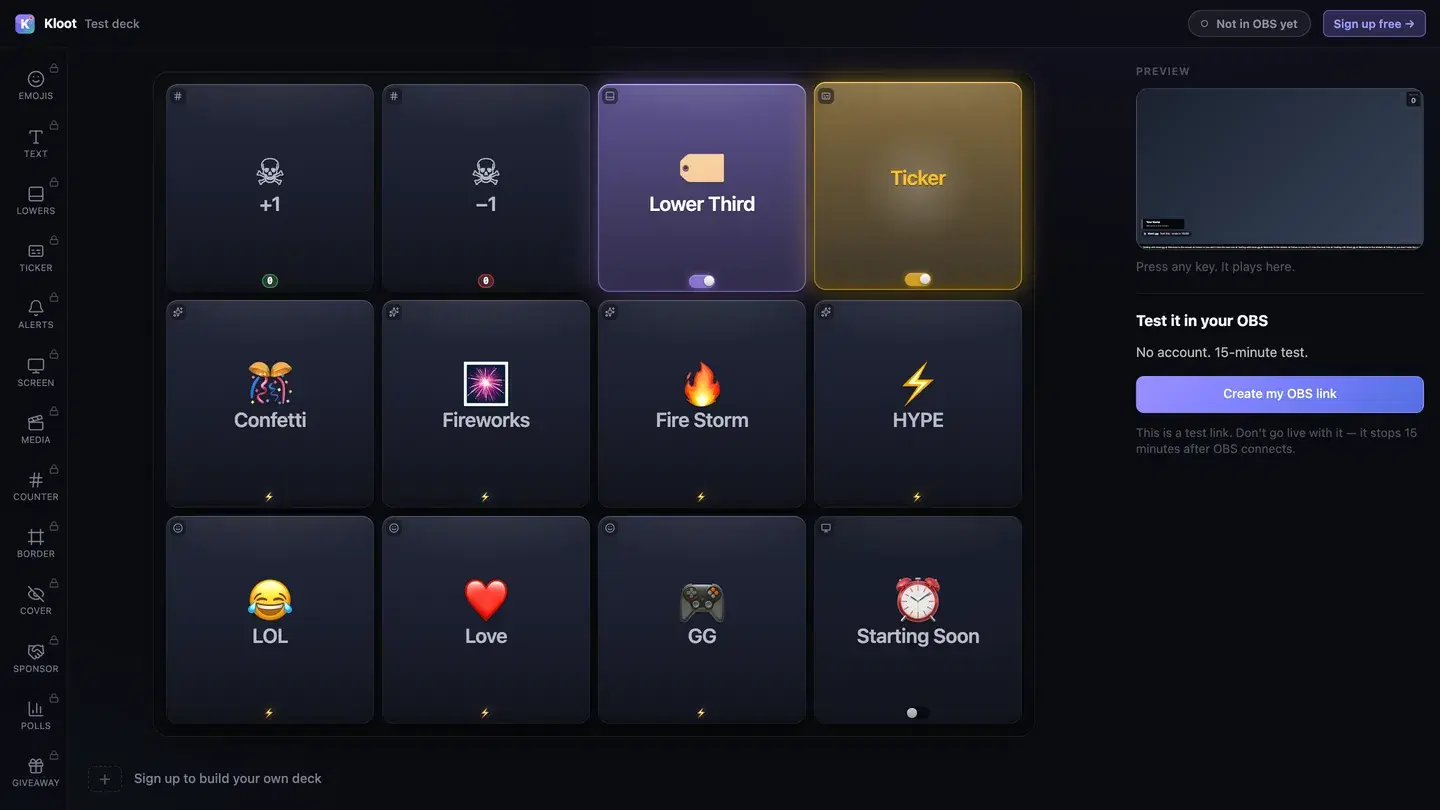
The Kloot test deck at /try: twelve keys in the middle, with Lower Third and Ticker switched on, a live preview of the stream on the right and a button that makes a link for OBS.
The free test deck at kloot.gg/try, exactly as it looks. Your own deck holds the keys you choose.

OBS · Browser source

URLhttps://kloot.gg/overlay/u/your-linkWidth1920Height1080
  1. 1

    Open the deck

    Open your deck in a browser. You can try it with no account.

  2. 2

    Add one Browser source

    In OBS, add a Browser source, paste your Kloot overlay link, and set it to 1920 × 1080.

  3. 3

    Press keys

    Press keys from the deck on your PC or your phone. Each one goes straight to your stream.

Hands free of OBS

Can I run it from my phone?

Yes. Your deck opens in your phone’s browser, so OBS, your guests and the conversation stay where they are. Nothing to install.

Control your stream from your phone

Your phone is the deck

KKloot LIVE
Full panel layout · auto-switches

Your stream reacts

LIVE👁 1,248
Poll opened

What should we play next?

Valorant
4242%
42%
Fortnite
3131%
31%
CS2
2727%
27%
Scan to vote
KLOOT
kloot.gg/join
The real overlay renderers — exactly what lands in your OBS

Screens library

Templates for shooter streams

🕹️ Pixel NightFree

Pixel type on a deep indigo field.

Use this template
🌆 Neon CityCreator

A neon grid running to the horizon.

Suits synthwave: add your own track

Use this template
⏱️ SpeedrunCreator

A red-black board with one beam across it.

Suits fast breaks: add your own track

Use this template
🎮 Couch Co-opCreator

Soft lights over a couch-night purple.

Use this template

Ways to run it

What does a shooter stream setup look like?

Example setup

A ranked grind

Hours of competitive matches.

  • Kill +1
  • Death +1
  • Scoreboard
  • HYPE

Kills and deaths sit in one scoreboard in the corner, and the deck lives on a phone beside the keyboard.

Runs on Pro

Example setup

A battle royale session

Solo matches, one life each.

  • Starting Soon
  • Kill +1
  • HYPE

Only kills are counted, so Free covers it. HYPE plays for every win.

Runs on Free

Plans

What does this setup cost?

Free

$0

forever

Covers

  • Starting Soon screen
  • kill counter
  • HYPE pop
  • ending card

Creator

$15/mo

or $8.25/mo billed yearly at $99

Adds

  • second counter for deaths

Pro

$25/mo

or $12.42/mo billed yearly at $149

Adds

  • scoreboard for kills and deaths

Everything on this page runs on Pro. See full pricing

Without Kloot

Kloot vs. doing it by hand in OBS

JobBy handWith Kloot
KillsA text source you retype between roundsKill +1 from your deck or your phone
Kills and deathsTwo text sources you line up by handOne scoreboard box, one spot on stream
The clutchA media source you dig out of a sceneOne HYPE key
A misclickEditing the text mid-match−1 on the deck
In OBSA source for every widgetOne Browser source for all of it

What Kloot doesn’t do

It never reads your chat, never switches your OBS scenes, and doesn’t detect anything on its own. Every change on screen is a key you, or someone you gave a link to, pressed.

Works alongside the tools you already stream with

OBS StudioStreamlabsTwitchYouTubeKick

Questions

How do I add a kill counter to my stream?

Make a counter labelled Kills, add your Kloot overlay link to OBS as a Browser source, and press +1 after a fight. Free includes one counter.

Add a live counter (kills / score / goals) to your stream

Does it track my kills automatically?

No. Kloot does not read your game or your stats. You press +1, from your deck or your phone, or on Creator from a Stream Deck.

How do I show K/D on stream?

Put a Kills counter and a Deaths counter in one scoreboard (Pro), so both numbers sit side by side in one spot. On Creator they run as two counters in their own spots.

Run a kill / death scoreboard on stream

Can I bump it from my phone?

Yes. Your deck opens in your phone’s browser, so you can press +1 between rounds without leaving the game.

Control your stream from your phone

Can I bump it from a Stream Deck?

Yes, on Creator. Each key has a private link that a Stream Deck Website action or a Streamer.bot Fetch URL can press.

Bump a counter from Stream Deck or Streamer.bot

Is there a kill counter for my game?

Yes. There are counter pages for Valorant, Apex Legends, Fortnite and Marvel Rivals, and the same counter works for any game.

Does it work with Streamlabs as well as OBS?

Yes. Everything on this page is one overlay link. Add it as a Browser source at 1920 × 1080 in OBS or in Streamlabs Desktop.

Which plan do I need?

Free covers the Starting Soon screen, kill counter, HYPE pop and ending card. Creator ($15/mo) adds the second counter for deaths. Pro ($25/mo) adds the scoreboard for kills and deaths.

90 seconds from now,
confetti hits your stream.

Sign in → paste one URL → press a button. That’s it. Your viewers will notice the difference tonight.

Free forever · Creator $99/yr or $15/mo · Pro $149/yr or $25/mo · Event Pass $9 for 3 days