Live podcast overlays for OBS

Run the show to a clock, without hiding your guests.

A live podcast has a shape: a pre-show, segments, a sponsor read, a goodbye. Each part is a key on your deck. Press it and it is on stream, low in the frame, so every face stays in view.

Try it in a browser — Free

Joined by streamers from 60+ countries. Try it with no account and no download.

Your deck · your stream

These are the real deck keys and the real overlays. Press one.

countries
60+

countries

counter bumps and key presses
12,000+

counter bumps and key presses

hours streamed with Kloot
500+

hours streamed with Kloot

What overlays does a live podcast need?

A pre-show card while people arrive, a name card for whoever is talking, a segment band that names the current part and counts it down, a topic ticker for latecomers, and an ending card. Each one is a key, so you press it without leaving the conversation.

One episode, start to finish

Run a whole episode from one deck

You press Starting Soon. A Starting Soon card with a countdown, so they know when you begin.

Run of show

Built for live podcasts

Set it up once, press it every episode

How do I put my guest’s name on screen?

Type their name and handle into a lower third once. The guest card key shows it when they start talking and clears it with a second press.

  • It sits low in the frame, so it never covers a face.
  • Change the name between guests in your panel; the key stays where it is on the deck.
  • Free includes it.

In your panel

On your stream

How do I show which segment we are on, and how long is left?

Make a screen per segment in the band layout: a strip across the bottom with the segment’s name and its own clock. Chain them, and each one hands on to the next at zero.

  • The band keeps every guest in view; nothing goes full screen mid-conversation.
  • You press the first segment. The clock does the rest.
  • Running long? Add time or move on early from the deck.

In your panel

On your stream

How do I show the sponsor during the read?

Set the brand, the code and the line you read once. Press the sponsor key when the read starts, and again when it ends.

  • The banner carries the sponsor’s name and colour, with the code called out so viewers can write it down.
  • The same key is ready for every episode; change the code when the deal changes.
  • On Pro.

In your panel

On your stream

Two minutes

How do I add live podcast overlays to OBS?

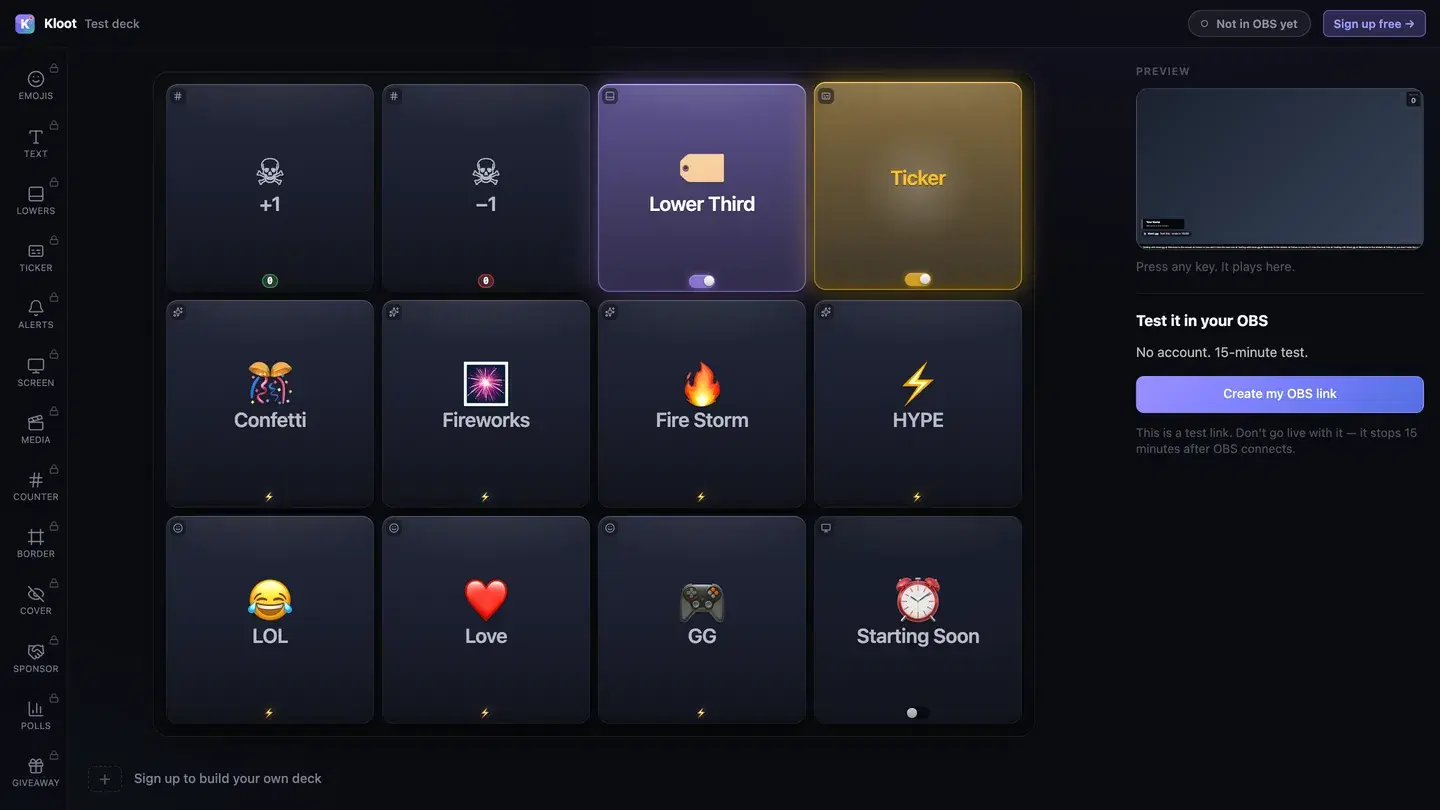
The Kloot test deck at /try: twelve keys in the middle, with Lower Third and Ticker switched on, a live preview of the stream on the right and a button that makes a link for OBS.
The free test deck at kloot.gg/try, exactly as it looks. Your own deck holds the keys you choose.

OBS · Browser source

URLhttps://kloot.gg/overlay/u/your-linkWidth1920Height1080
  1. 1

    Open the deck

    Open your deck in a browser. You can try it with no account.

  2. 2

    Add one Browser source

    In OBS, add a Browser source, paste your Kloot overlay link, and set it to 1920 × 1080.

  3. 3

    Press keys

    Press keys from the deck on your PC or your phone. Each one goes straight to your stream.

Hands free of OBS

Can I run it from my phone?

Yes. Your deck opens in your phone’s browser, so OBS, your guests and the conversation stay where they are. Nothing to install.

Control your stream from your phone

Your phone is the deck

KKloot LIVE
Full panel layout · auto-switches

Your stream reacts

LIVE👁 1,248
Poll opened

What should we play next?

Valorant
4242%
42%
Fortnite
3131%
31%
CS2
2727%
27%
Scan to vote
KLOOT
kloot.gg/join
The real overlay renderers — exactly what lands in your OBS

Screens library

Templates for live podcasts

🪑 Green RoomFree

Deep green walls, quiet type.

Use this template
🎙️ StudioCreator

A warm studio with a slow light across it.

Suits show bed (optional): add your own track

Use this template
🎧 Talk BackCreator

Soft blue lights behind a talk set.

Suits show bed: add your own track

Use this template
⏸️ Segment BreakCreator

Low haze under a stage grey.

Use this template

Ways to run it

What does a live podcast setup look like?

Example setup

A weekly two-host podcast

Two hosts and a guest, about an hour, every week.

  • Starting Soon
  • Guest card
  • Next segment
  • Ending card

The segments are chained, so the hosts press the first one and talk; the band moves on by itself.

Runs on Creator

Example setup

A sponsored interview show

One host, one guest, one paid read per episode.

  • Guest card
  • Topic ticker
  • Sponsor
  • Ending card

A producer runs the deck from their phone, so the host never looks away from the guest.

Runs on Pro

Example setup

A solo news round-up

One host working through the week’s stories.

  • Starting Soon
  • Topic ticker
  • Next segment

The ticker carries the story list, so a late viewer catches up without asking in chat.

Runs on Creator

Plans

What does this setup cost?

Free

$0

forever

Covers

  • Starting Soon screen
  • guest card
  • topic ticker
  • ending card

Creator

$15/mo

or $8.25/mo billed yearly at $99

Adds

  • segment band with its hand-off

Pro

$25/mo

or $12.42/mo billed yearly at $149

Adds

  • sponsor banner

Everything on this page runs on Pro. See full pricing

Without Kloot

Kloot vs. doing it by hand in OBS

JobBy handWith Kloot
The pre-showA looping scene, plus a timer site captured as a second sourceA Starting Soon screen with the countdown built in
A guest’s nameA text source per guest, typed and toggled in OBSOne guest card key; type the name in your panel
The segment clockA stopwatch someone resets by handA band that counts down and hands on at zero
The sponsor readAn image you have to remember to showA sponsor key with the brand and the code
Running it liveAlt-tab to OBS mid-sentencePress keys from your phone or a second screen
In OBSA source for every graphicOne Browser source for all of it

What Kloot doesn’t do

It never reads your chat, never switches your OBS scenes, and doesn’t detect anything on its own. Every change on screen is a key you, or someone you gave a link to, pressed.

Works alongside the tools you already stream with

OBS StudioStreamlabsTwitchYouTubeKick

Questions

How do I add a lower third to a live podcast?

Make a lower third with your guest’s name and handle, and press its key on the deck when they start talking. It slides in at the bottom of the frame and clears with a second press. Lower thirds are on Free.

Add a lower third to your stream

How do I add a segment timer to a podcast stream?

Make a screen for each segment in the band layout and give it a countdown. The band is a strip across the bottom, so every guest stays visible, and a segment can hand on to the next when its clock reaches zero.

Segment cards for a live podcast

How do I add a Starting Soon screen before the podcast?

Turn on a Starting Soon screen with a countdown to your start time. Viewers who arrive early see when you begin; you press one key to go live.

Starting Soon that hands off by itself

How do I show the topics for late viewers?

Put a scrolling ticker at the bottom with today’s topics and where to send questions. It runs on its own while you talk.

Add a scrolling ticker to your stream

How do I show a sponsor during a podcast read?

Set up the sponsor once, with the brand, the code and the line you read. Press its key for the read and again when it is done. Sponsor overlays are on Pro.

Add sponsor ads to your stream

Can I run the overlays from my phone?

Yes. Your deck opens in your phone’s browser, so you can press keys without leaving the conversation or touching OBS.

Control your stream from your phone

Can my co-host run the overlays without my account?

Yes, on Creator. Give them a co-pilot link, which they open on their own phone and sign in to once. They can show and hide the screens the link names and add time; they cannot see the rest of your account, and you can revoke the link at any time.

Does it work with Streamlabs as well as OBS?

Yes. Everything on this page is one overlay link. Add it as a Browser source at 1920 × 1080 in OBS or in Streamlabs Desktop.

Which plan do I need?

Free covers the Starting Soon screen, guest card, topic ticker and ending card. Creator ($15/mo) adds the segment band with its hand-off. Pro ($25/mo) adds the sponsor banner.

90 seconds from now,
confetti hits your stream.

Sign in → paste one URL → press a button. That’s it. Your viewers will notice the difference tonight.

Free forever · Creator $99/yr or $15/mo · Pro $149/yr or $25/mo · Event Pass $9 for 3 days