How to give your mods a Stream Deck for your stream
The counter your mod can press is better when it is a real key on their desk. Share your deck once; every helper then connects their own Stream Deck with their own code and gets your keys with their role. No token of yours ever leaves your account.
Can my mod use a Stream Deck with my Kloot deck?
Yes, on Pro. Share your deck with them as Operator or Editor. They open the shared deck in their own Kloot account, press the Stream Deck button, and type the code into the Kloot plugin on their Stream Deck. Their presses show their name in your history.
%20scale(0.8333333333333334)%22%20fill%3D%22none%22%20stroke%3D%22%23ffffff%22%20stroke-opacity%3D%220.75%22%20stroke-width%3D%222%22%20stroke-linecap%3D%22round%22%20stroke-linejoin%3D%22round%22%3E%3Cline%20x1%3D%224%22%20x2%3D%2220%22%20y1%3D%229%22%20y2%3D%229%22%2F%3E%3Cline%20x1%3D%224%22%20x2%3D%2220%22%20y1%3D%2215%22%20y2%3D%2215%22%2F%3E%3Cline%20x1%3D%2210%22%20x2%3D%228%22%20y1%3D%223%22%20y2%3D%2221%22%2F%3E%3Cline%20x1%3D%2216%22%20x2%3D%2214%22%20y1%3D%223%22%20y2%3D%2221%22%2F%3E%3C%2Fg%3E%3Ctext%20x%3D%2272%22%20y%3D%2282%22%20text-anchor%3D%22middle%22%20font-family%3D%22-apple-system%2C%20%26%2339%3BSegoe%20UI%26%2339%3B%2C%20Roboto%2C%20Helvetica%2C%20Arial%2C%20sans-serif%22%20font-size%3D%2258%22%20font-weight%3D%22600%22%20fill%3D%22%23ffffff%22%3E%2B%3C%2Ftext%3E%3C%2Fsvg%3E) Deaths +1
Deaths +1%20scale(0.8333333333333334)%22%20fill%3D%22none%22%20stroke%3D%22%23ffffff%22%20stroke-opacity%3D%220.75%22%20stroke-width%3D%222%22%20stroke-linecap%3D%22round%22%20stroke-linejoin%3D%22round%22%3E%3Cline%20x1%3D%224%22%20x2%3D%2220%22%20y1%3D%229%22%20y2%3D%229%22%2F%3E%3Cline%20x1%3D%224%22%20x2%3D%2220%22%20y1%3D%2215%22%20y2%3D%2215%22%2F%3E%3Cline%20x1%3D%2210%22%20x2%3D%228%22%20y1%3D%223%22%20y2%3D%2221%22%2F%3E%3Cline%20x1%3D%2216%22%20x2%3D%2214%22%20y1%3D%223%22%20y2%3D%2221%22%2F%3E%3C%2Fg%3E%3Ctext%20x%3D%2272%22%20y%3D%2282%22%20text-anchor%3D%22middle%22%20font-family%3D%22-apple-system%2C%20%26%2339%3BSegoe%20UI%26%2339%3B%2C%20Roboto%2C%20Helvetica%2C%20Arial%2C%20sans-serif%22%20font-size%3D%2258%22%20font-weight%3D%22600%22%20fill%3D%22%23ffffff%22%3E%E2%88%92%3C%2Ftext%3E%3C%2Fsvg%3E) Deaths −1
Deaths −1%20scale(0.8333333333333334)%22%20fill%3D%22none%22%20stroke%3D%22%23ffffff%22%20stroke-opacity%3D%220.75%22%20stroke-width%3D%222%22%20stroke-linecap%3D%22round%22%20stroke-linejoin%3D%22round%22%3E%3Crect%20width%3D%2220%22%20height%3D%2214%22%20x%3D%222%22%20y%3D%223%22%20rx%3D%222%22%2F%3E%3Cline%20x1%3D%228%22%20x2%3D%2216%22%20y1%3D%2221%22%20y2%3D%2221%22%2F%3E%3Cline%20x1%3D%2212%22%20x2%3D%2212%22%20y1%3D%2217%22%20y2%3D%2221%22%2F%3E%3C%2Fg%3E%3Ctext%20x%3D%2272%22%20y%3D%2282%22%20text-anchor%3D%22middle%22%20font-family%3D%22%26%2339%3BApple%20Color%20Emoji%26%2339%3B%2C%20%26%2339%3BSegoe%20UI%20Emoji%26%2339%3B%2C%20%26%2339%3BNoto%20Color%20Emoji%26%2339%3B%2C%20sans-serif%22%20font-size%3D%2258%22%20font-weight%3D%22600%22%20fill%3D%22%23ffffff%22%3E%E2%8F%B0%3C%2Ftext%3E%3C%2Fsvg%3E) Starting soon
Starting soon%20scale(0.8333333333333334)%22%20fill%3D%22none%22%20stroke%3D%22%23ffffff%22%20stroke-opacity%3D%220.75%22%20stroke-width%3D%222%22%20stroke-linecap%3D%22round%22%20stroke-linejoin%3D%22round%22%3E%3Crect%20width%3D%2220%22%20height%3D%2214%22%20x%3D%222%22%20y%3D%223%22%20rx%3D%222%22%2F%3E%3Cline%20x1%3D%228%22%20x2%3D%2216%22%20y1%3D%2221%22%20y2%3D%2221%22%2F%3E%3Cline%20x1%3D%2212%22%20x2%3D%2212%22%20y1%3D%2217%22%20y2%3D%2221%22%2F%3E%3C%2Fg%3E%3Ctext%20x%3D%2272%22%20y%3D%2282%22%20text-anchor%3D%22middle%22%20font-family%3D%22%26%2339%3BApple%20Color%20Emoji%26%2339%3B%2C%20%26%2339%3BSegoe%20UI%20Emoji%26%2339%3B%2C%20%26%2339%3BNoto%20Color%20Emoji%26%2339%3B%2C%20sans-serif%22%20font-size%3D%2258%22%20font-weight%3D%22600%22%20fill%3D%22%23ffffff%22%3E%E2%98%95%3C%2Ftext%3E%3C%2Fsvg%3E) BRB
BRB%20scale(0.8333333333333334)%22%20fill%3D%22none%22%20stroke%3D%22%23ffffff%22%20stroke-opacity%3D%220.75%22%20stroke-width%3D%222%22%20stroke-linecap%3D%22round%22%20stroke-linejoin%3D%22round%22%3E%3Ccircle%20cx%3D%2212%22%20cy%3D%2212%22%20r%3D%2210%22%2F%3E%3Cpath%20d%3D%22M8%2014s1.5%202%204%202%204-2%204-2%22%2F%3E%3Cline%20x1%3D%229%22%20x2%3D%229.01%22%20y1%3D%229%22%20y2%3D%229%22%2F%3E%3Cline%20x1%3D%2215%22%20x2%3D%2215.01%22%20y1%3D%229%22%20y2%3D%229%22%2F%3E%3C%2Fg%3E%3Ctext%20x%3D%2272%22%20y%3D%2282%22%20text-anchor%3D%22middle%22%20font-family%3D%22%26%2339%3BApple%20Color%20Emoji%26%2339%3B%2C%20%26%2339%3BSegoe%20UI%20Emoji%26%2339%3B%2C%20%26%2339%3BNoto%20Color%20Emoji%26%2339%3B%2C%20sans-serif%22%20font-size%3D%2258%22%20font-weight%3D%22600%22%20fill%3D%22%23ffffff%22%3E%F0%9F%8E%89%3C%2Ftext%3E%3C%2Fsvg%3E) Confetti
Confetti%20scale(0.8333333333333334)%22%20fill%3D%22none%22%20stroke%3D%22%23ffffff%22%20stroke-opacity%3D%220.75%22%20stroke-width%3D%222%22%20stroke-linecap%3D%22round%22%20stroke-linejoin%3D%22round%22%3E%3Ccircle%20cx%3D%2212%22%20cy%3D%2212%22%20r%3D%2210%22%2F%3E%3Cpath%20d%3D%22M8%2014s1.5%202%204%202%204-2%204-2%22%2F%3E%3Cline%20x1%3D%229%22%20x2%3D%229.01%22%20y1%3D%229%22%20y2%3D%229%22%2F%3E%3Cline%20x1%3D%2215%22%20x2%3D%2215.01%22%20y1%3D%229%22%20y2%3D%229%22%2F%3E%3C%2Fg%3E%3Ctext%20x%3D%2272%22%20y%3D%2282%22%20text-anchor%3D%22middle%22%20font-family%3D%22%26%2339%3BApple%20Color%20Emoji%26%2339%3B%2C%20%26%2339%3BSegoe%20UI%20Emoji%26%2339%3B%2C%20%26%2339%3BNoto%20Color%20Emoji%26%2339%3B%2C%20sans-serif%22%20font-size%3D%2258%22%20font-weight%3D%22600%22%20fill%3D%22%23ffffff%22%3E%F0%9F%8F%86%3C%2Ftext%3E%3C%2Fsvg%3E) GG
GG%20scale(0.8333333333333334)%22%20fill%3D%22none%22%20stroke%3D%22%23ffffff%22%20stroke-opacity%3D%220.75%22%20stroke-width%3D%222%22%20stroke-linecap%3D%22round%22%20stroke-linejoin%3D%22round%22%3E%3Cpath%20d%3D%22M20.2%206%203%2011l-.9-2.4c-.3-1.1.3-2.2%201.3-2.5l13.5-4c1.1-.3%202.2.3%202.5%201.3Z%22%2F%3E%3Cpath%20d%3D%22m6.2%205.3%203.1%203.9%22%2F%3E%3Cpath%20d%3D%22m12.4%203.4%203.1%204%22%2F%3E%3Cpath%20d%3D%22M3%2011h18v8a2%202%200%200%201-2%202H5a2%202%200%200%201-2-2Z%22%2F%3E%3C%2Fg%3E%3Ctext%20x%3D%2272%22%20y%3D%2282%22%20text-anchor%3D%22middle%22%20font-family%3D%22%26%2339%3BApple%20Color%20Emoji%26%2339%3B%2C%20%26%2339%3BSegoe%20UI%20Emoji%26%2339%3B%2C%20%26%2339%3BNoto%20Color%20Emoji%26%2339%3B%2C%20sans-serif%22%20font-size%3D%2258%22%20font-weight%3D%22600%22%20fill%3D%22%23ffffff%22%3E%F0%9F%93%AF%3C%2Ftext%3E%3C%2Fsvg%3E) Airhorn
Airhorn%20scale(0.8333333333333334)%22%20fill%3D%22none%22%20stroke%3D%22%23ffffff%22%20stroke-opacity%3D%220.75%22%20stroke-width%3D%222%22%20stroke-linecap%3D%22round%22%20stroke-linejoin%3D%22round%22%3E%3Crect%20width%3D%2218%22%20height%3D%2218%22%20x%3D%223%22%20y%3D%223%22%20rx%3D%222%22%2F%3E%3Cpath%20d%3D%22M3%2015h18%22%2F%3E%3C%2Fg%3E%3Ctext%20x%3D%2272%22%20y%3D%2282%22%20text-anchor%3D%22middle%22%20font-family%3D%22%26%2339%3BApple%20Color%20Emoji%26%2339%3B%2C%20%26%2339%3BSegoe%20UI%20Emoji%26%2339%3B%2C%20%26%2339%3BNoto%20Color%20Emoji%26%2339%3B%2C%20sans-serif%22%20font-size%3D%2258%22%20font-weight%3D%22600%22%20fill%3D%22%23ffffff%22%3E%F0%9F%AA%AA%3C%2Ftext%3E%3C%2Fsvg%3E) Name bar
Name bar%20scale(0.8333333333333334)%22%20fill%3D%22none%22%20stroke%3D%22%23ffffff%22%20stroke-opacity%3D%220.75%22%20stroke-width%3D%222%22%20stroke-linecap%3D%22round%22%20stroke-linejoin%3D%22round%22%3E%3Cpath%20d%3D%22m11%2017%202%202a1%201%200%201%200%203-3%22%2F%3E%3Cpath%20d%3D%22m14%2014%202.5%202.5a1%201%200%201%200%203-3l-3.88-3.88a3%203%200%200%200-4.24%200l-.88.88a1%201%200%201%201-3-3l2.81-2.81a5.79%205.79%200%200%201%207.06-.87l.47.28a2%202%200%200%200%201.42.25L21%204%22%2F%3E%3Cpath%20d%3D%22m21%203%201%2011h-2%22%2F%3E%3Cpath%20d%3D%22M3%203%202%2014l6.5%206.5a1%201%200%201%200%203-3%22%2F%3E%3Cpath%20d%3D%22M3%204h8%22%2F%3E%3C%2Fg%3E%3Ctext%20x%3D%2272%22%20y%3D%2282%22%20text-anchor%3D%22middle%22%20font-family%3D%22%26%2339%3BApple%20Color%20Emoji%26%2339%3B%2C%20%26%2339%3BSegoe%20UI%20Emoji%26%2339%3B%2C%20%26%2339%3BNoto%20Color%20Emoji%26%2339%3B%2C%20sans-serif%22%20font-size%3D%2258%22%20font-weight%3D%22600%22%20fill%3D%22%23ffffff%22%3E%F0%9F%A4%9D%3C%2Ftext%3E%3C%2Fsvg%3E) Sponsor
Sponsor%20scale(0.8333333333333334)%22%20fill%3D%22none%22%20stroke%3D%22%23ffffff%22%20stroke-opacity%3D%220.75%22%20stroke-width%3D%222%22%20stroke-linecap%3D%22round%22%20stroke-linejoin%3D%22round%22%3E%3Crect%20x%3D%223%22%20y%3D%228%22%20width%3D%2218%22%20height%3D%224%22%20rx%3D%221%22%2F%3E%3Cpath%20d%3D%22M12%208v13%22%2F%3E%3Cpath%20d%3D%22M19%2012v7a2%202%200%200%201-2%202H7a2%202%200%200%201-2-2v-7%22%2F%3E%3Cpath%20d%3D%22M7.5%208a2.5%202.5%200%200%201%200-5A4.8%208%200%200%201%2012%208a4.8%208%200%200%201%204.5-5%202.5%202.5%200%200%201%200%205%22%2F%3E%3C%2Fg%3E%3Ctext%20x%3D%2272%22%20y%3D%2282%22%20text-anchor%3D%22middle%22%20font-family%3D%22%26%2339%3BApple%20Color%20Emoji%26%2339%3B%2C%20%26%2339%3BSegoe%20UI%20Emoji%26%2339%3B%2C%20%26%2339%3BNoto%20Color%20Emoji%26%2339%3B%2C%20sans-serif%22%20font-size%3D%2258%22%20font-weight%3D%22600%22%20fill%3D%22%23ffffff%22%3E%F0%9F%8E%81%3C%2Ftext%3E%3C%2Fsvg%3E) Giveaway
GiveawayWhat you’ll build
Each helper has your deck on their Stream Deck, pressing as themselves, with the limits of their role.
Step by step
- 1
Share your deck
Press Share in the top bar and invite your helper as Operator (press keys) or Editor (also change tools). They accept from their own account; your deck appears as a tab in their panel.
- 2
They open the Stream Deck sheet
On the shared-deck tab, the same Stream Deck button is there. Their code is bound to them and to your deck.
- 3
They load your deck
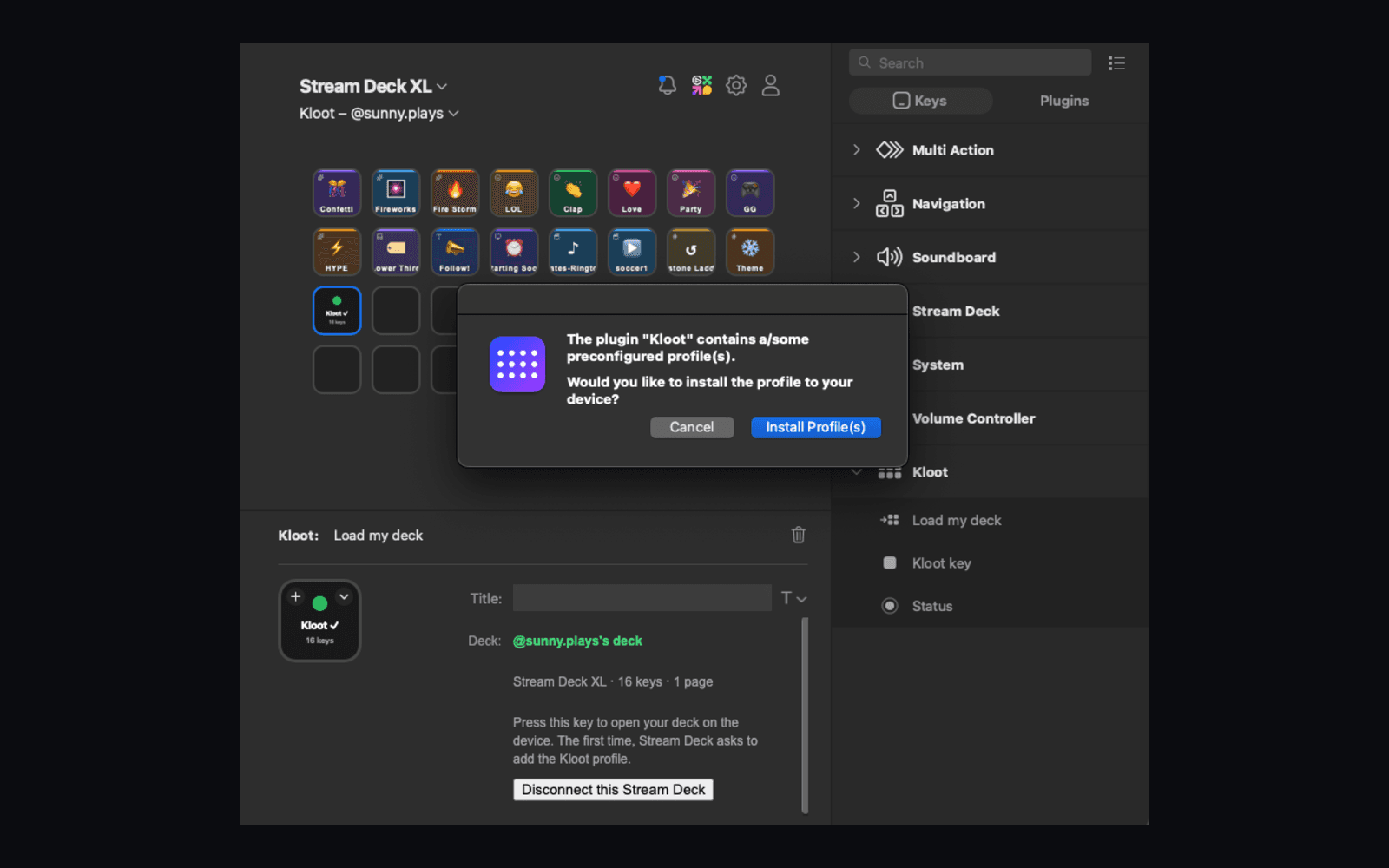
In their Stream Deck app: Kloot → Load my deck → the code → press. Your keys land on their device with your icons, as their role allows. Giveaway and poll keys open Kloot.
The first time, Stream Deck asks to install the Kloot profile. Say yes.
- 4
See who pressed
Every press carries their name in your counter history and recap. Their Stream Decks show on their row in your Share dialog.
- 5
Remove or pause
Remove a helper in Share and their Stream Deck keys go dark at once. If your plan pauses, their keys show “Paused by” your name until it resumes.
Common mistakes to avoid
- ✕Inviting with an old per-counter link — sharing is the whole deck now.
- ✕Giving a helper Editor when Operator is enough; Editors can change your tools.
- ✕Forgetting that removing a helper also removes their devices (that is the point).
Frequently asked
Can a helper see my overlay link or billing?
No. Their device token presses keys as them and nothing else.
Can two mods use Stream Decks at once?
Yes, up to the helpers your plan includes. Each device has its own token.
Do they need Pro?
No. They need a Kloot account; the Stream Deck feature comes from your plan.
Can they use the profile file instead of the plugin?
Yes. From the same sheet, with their own token. Giveaway and poll keys open Kloot on that path too.
Which plan is this on?
Pro ($9/month), for the deck owner.
Your crew.
Their keys.
Sharing and Stream Deck are part of Pro.
Free forever · Pro $9/month or $79/year · Event Pass $5 for 48 hours · Prices + applicable taxes