 +
+Kloot + Stream Deck — every key, one code
Open the Stream Deck sheet in Kloot, read the code, type it into the Kloot plugin on your Stream Deck. Every key on your deck lands on the device with its icon, its label and, for counters and screens, its live state. No URLs to copy, no icons to size, nothing to pair over Wi-Fi. Your mods connect their own Stream Decks to your deck with their role. Part of Pro.
Start free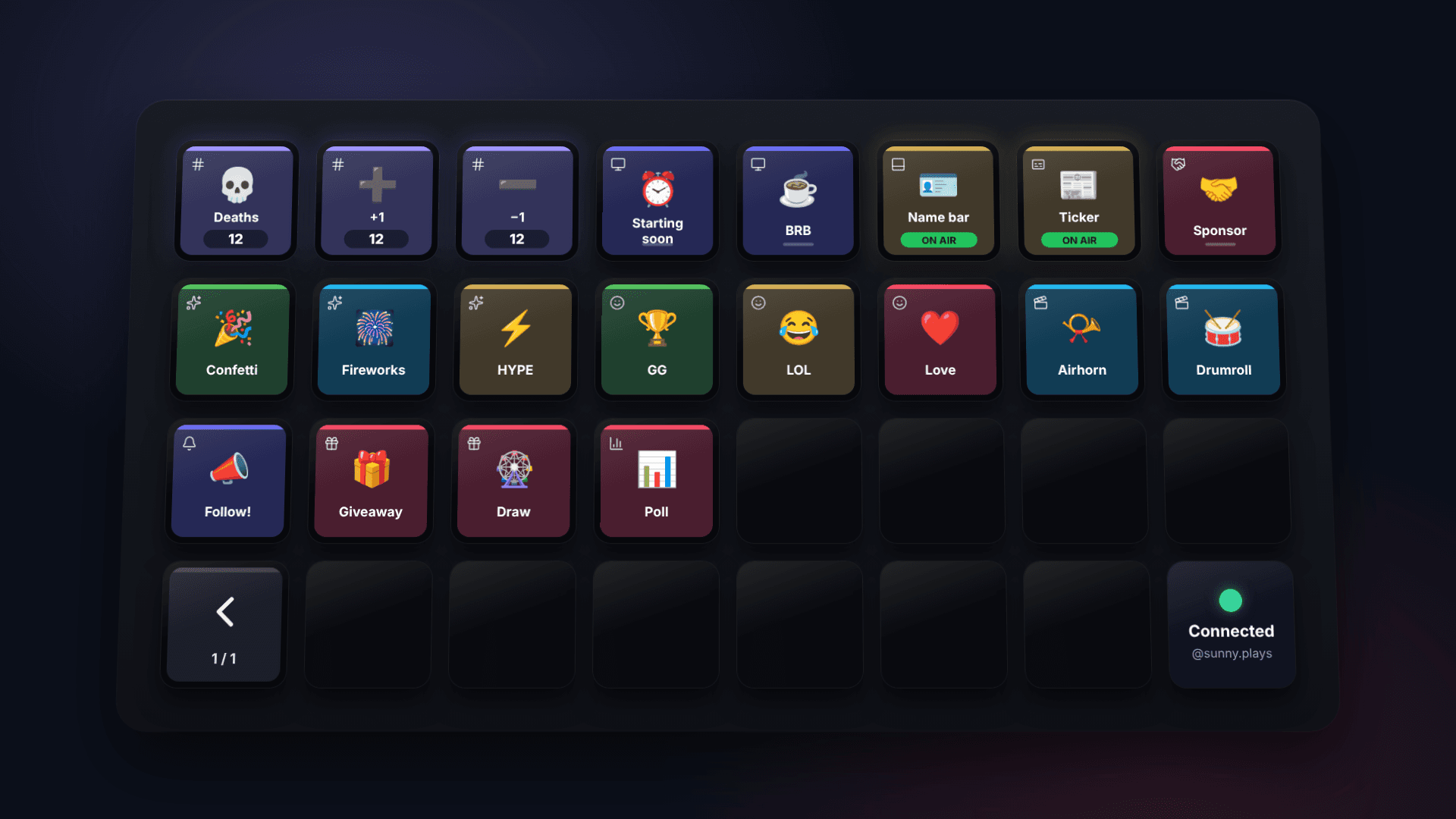
How it works
Your Kloot deck, on your Stream Deck, in one click.
- 1
Get the Kloot plugin once
Download it from this page and double-click the file; Stream Deck installs it. It needs Stream Deck 7.1 or later.
- 2
Open the Stream Deck sheet in Kloot
It is the Stream Deck button in your deck header. The sheet shows a six-character code that is good for ten minutes.
- 3
Type the code into “Load my deck”
In the Stream Deck app, drag Kloot → Load my deck onto any key, type the code, press the key. Your Stream Deck fills with every key on your Kloot deck, in the order you see them in the panel.
- 4
Press anything
A counter key shows its count and bumps on press (hold for −1). A screen key lights up while the screen is on air. Sounds, emoji, text and sponsors fire. Giveaway and poll keys open Kloot.
- 5
Give your mods theirs
A helper on your shared deck opens the same sheet from their own account and gets your deck on their Stream Deck, as Operator or Editor. Remove them in Share and their keys go dark at once.
%20scale(0.8333333333333334)%22%20fill%3D%22none%22%20stroke%3D%22%23ffffff%22%20stroke-opacity%3D%220.75%22%20stroke-width%3D%222%22%20stroke-linecap%3D%22round%22%20stroke-linejoin%3D%22round%22%3E%3Cline%20x1%3D%224%22%20x2%3D%2220%22%20y1%3D%229%22%20y2%3D%229%22%2F%3E%3Cline%20x1%3D%224%22%20x2%3D%2220%22%20y1%3D%2215%22%20y2%3D%2215%22%2F%3E%3Cline%20x1%3D%2210%22%20x2%3D%228%22%20y1%3D%223%22%20y2%3D%2221%22%2F%3E%3Cline%20x1%3D%2216%22%20x2%3D%2214%22%20y1%3D%223%22%20y2%3D%2221%22%2F%3E%3C%2Fg%3E%3Ctext%20x%3D%2272%22%20y%3D%2282%22%20text-anchor%3D%22middle%22%20font-family%3D%22-apple-system%2C%20%26%2339%3BSegoe%20UI%26%2339%3B%2C%20Roboto%2C%20Helvetica%2C%20Arial%2C%20sans-serif%22%20font-size%3D%2258%22%20font-weight%3D%22600%22%20fill%3D%22%23ffffff%22%3E%2B%3C%2Ftext%3E%3C%2Fsvg%3E) Deaths +1
Deaths +1%20scale(0.8333333333333334)%22%20fill%3D%22none%22%20stroke%3D%22%23ffffff%22%20stroke-opacity%3D%220.75%22%20stroke-width%3D%222%22%20stroke-linecap%3D%22round%22%20stroke-linejoin%3D%22round%22%3E%3Cline%20x1%3D%224%22%20x2%3D%2220%22%20y1%3D%229%22%20y2%3D%229%22%2F%3E%3Cline%20x1%3D%224%22%20x2%3D%2220%22%20y1%3D%2215%22%20y2%3D%2215%22%2F%3E%3Cline%20x1%3D%2210%22%20x2%3D%228%22%20y1%3D%223%22%20y2%3D%2221%22%2F%3E%3Cline%20x1%3D%2216%22%20x2%3D%2214%22%20y1%3D%223%22%20y2%3D%2221%22%2F%3E%3C%2Fg%3E%3Ctext%20x%3D%2272%22%20y%3D%2282%22%20text-anchor%3D%22middle%22%20font-family%3D%22-apple-system%2C%20%26%2339%3BSegoe%20UI%26%2339%3B%2C%20Roboto%2C%20Helvetica%2C%20Arial%2C%20sans-serif%22%20font-size%3D%2258%22%20font-weight%3D%22600%22%20fill%3D%22%23ffffff%22%3E%E2%88%92%3C%2Ftext%3E%3C%2Fsvg%3E) Deaths −1
Deaths −1%20scale(0.8333333333333334)%22%20fill%3D%22none%22%20stroke%3D%22%23ffffff%22%20stroke-opacity%3D%220.75%22%20stroke-width%3D%222%22%20stroke-linecap%3D%22round%22%20stroke-linejoin%3D%22round%22%3E%3Crect%20width%3D%2220%22%20height%3D%2214%22%20x%3D%222%22%20y%3D%223%22%20rx%3D%222%22%2F%3E%3Cline%20x1%3D%228%22%20x2%3D%2216%22%20y1%3D%2221%22%20y2%3D%2221%22%2F%3E%3Cline%20x1%3D%2212%22%20x2%3D%2212%22%20y1%3D%2217%22%20y2%3D%2221%22%2F%3E%3C%2Fg%3E%3Ctext%20x%3D%2272%22%20y%3D%2282%22%20text-anchor%3D%22middle%22%20font-family%3D%22%26%2339%3BApple%20Color%20Emoji%26%2339%3B%2C%20%26%2339%3BSegoe%20UI%20Emoji%26%2339%3B%2C%20%26%2339%3BNoto%20Color%20Emoji%26%2339%3B%2C%20sans-serif%22%20font-size%3D%2258%22%20font-weight%3D%22600%22%20fill%3D%22%23ffffff%22%3E%E2%8F%B0%3C%2Ftext%3E%3C%2Fsvg%3E) Starting soon
Starting soon%20scale(0.8333333333333334)%22%20fill%3D%22none%22%20stroke%3D%22%23ffffff%22%20stroke-opacity%3D%220.75%22%20stroke-width%3D%222%22%20stroke-linecap%3D%22round%22%20stroke-linejoin%3D%22round%22%3E%3Crect%20width%3D%2220%22%20height%3D%2214%22%20x%3D%222%22%20y%3D%223%22%20rx%3D%222%22%2F%3E%3Cline%20x1%3D%228%22%20x2%3D%2216%22%20y1%3D%2221%22%20y2%3D%2221%22%2F%3E%3Cline%20x1%3D%2212%22%20x2%3D%2212%22%20y1%3D%2217%22%20y2%3D%2221%22%2F%3E%3C%2Fg%3E%3Ctext%20x%3D%2272%22%20y%3D%2282%22%20text-anchor%3D%22middle%22%20font-family%3D%22%26%2339%3BApple%20Color%20Emoji%26%2339%3B%2C%20%26%2339%3BSegoe%20UI%20Emoji%26%2339%3B%2C%20%26%2339%3BNoto%20Color%20Emoji%26%2339%3B%2C%20sans-serif%22%20font-size%3D%2258%22%20font-weight%3D%22600%22%20fill%3D%22%23ffffff%22%3E%E2%98%95%3C%2Ftext%3E%3C%2Fsvg%3E) BRB
BRB%20scale(0.8333333333333334)%22%20fill%3D%22none%22%20stroke%3D%22%23ffffff%22%20stroke-opacity%3D%220.75%22%20stroke-width%3D%222%22%20stroke-linecap%3D%22round%22%20stroke-linejoin%3D%22round%22%3E%3Ccircle%20cx%3D%2212%22%20cy%3D%2212%22%20r%3D%2210%22%2F%3E%3Cpath%20d%3D%22M8%2014s1.5%202%204%202%204-2%204-2%22%2F%3E%3Cline%20x1%3D%229%22%20x2%3D%229.01%22%20y1%3D%229%22%20y2%3D%229%22%2F%3E%3Cline%20x1%3D%2215%22%20x2%3D%2215.01%22%20y1%3D%229%22%20y2%3D%229%22%2F%3E%3C%2Fg%3E%3Ctext%20x%3D%2272%22%20y%3D%2282%22%20text-anchor%3D%22middle%22%20font-family%3D%22%26%2339%3BApple%20Color%20Emoji%26%2339%3B%2C%20%26%2339%3BSegoe%20UI%20Emoji%26%2339%3B%2C%20%26%2339%3BNoto%20Color%20Emoji%26%2339%3B%2C%20sans-serif%22%20font-size%3D%2258%22%20font-weight%3D%22600%22%20fill%3D%22%23ffffff%22%3E%F0%9F%8E%89%3C%2Ftext%3E%3C%2Fsvg%3E) Confetti
Confetti%20scale(0.8333333333333334)%22%20fill%3D%22none%22%20stroke%3D%22%23ffffff%22%20stroke-opacity%3D%220.75%22%20stroke-width%3D%222%22%20stroke-linecap%3D%22round%22%20stroke-linejoin%3D%22round%22%3E%3Ccircle%20cx%3D%2212%22%20cy%3D%2212%22%20r%3D%2210%22%2F%3E%3Cpath%20d%3D%22M8%2014s1.5%202%204%202%204-2%204-2%22%2F%3E%3Cline%20x1%3D%229%22%20x2%3D%229.01%22%20y1%3D%229%22%20y2%3D%229%22%2F%3E%3Cline%20x1%3D%2215%22%20x2%3D%2215.01%22%20y1%3D%229%22%20y2%3D%229%22%2F%3E%3C%2Fg%3E%3Ctext%20x%3D%2272%22%20y%3D%2282%22%20text-anchor%3D%22middle%22%20font-family%3D%22%26%2339%3BApple%20Color%20Emoji%26%2339%3B%2C%20%26%2339%3BSegoe%20UI%20Emoji%26%2339%3B%2C%20%26%2339%3BNoto%20Color%20Emoji%26%2339%3B%2C%20sans-serif%22%20font-size%3D%2258%22%20font-weight%3D%22600%22%20fill%3D%22%23ffffff%22%3E%F0%9F%8F%86%3C%2Ftext%3E%3C%2Fsvg%3E) GG
GG%20scale(0.8333333333333334)%22%20fill%3D%22none%22%20stroke%3D%22%23ffffff%22%20stroke-opacity%3D%220.75%22%20stroke-width%3D%222%22%20stroke-linecap%3D%22round%22%20stroke-linejoin%3D%22round%22%3E%3Cpath%20d%3D%22M20.2%206%203%2011l-.9-2.4c-.3-1.1.3-2.2%201.3-2.5l13.5-4c1.1-.3%202.2.3%202.5%201.3Z%22%2F%3E%3Cpath%20d%3D%22m6.2%205.3%203.1%203.9%22%2F%3E%3Cpath%20d%3D%22m12.4%203.4%203.1%204%22%2F%3E%3Cpath%20d%3D%22M3%2011h18v8a2%202%200%200%201-2%202H5a2%202%200%200%201-2-2Z%22%2F%3E%3C%2Fg%3E%3Ctext%20x%3D%2272%22%20y%3D%2282%22%20text-anchor%3D%22middle%22%20font-family%3D%22%26%2339%3BApple%20Color%20Emoji%26%2339%3B%2C%20%26%2339%3BSegoe%20UI%20Emoji%26%2339%3B%2C%20%26%2339%3BNoto%20Color%20Emoji%26%2339%3B%2C%20sans-serif%22%20font-size%3D%2258%22%20font-weight%3D%22600%22%20fill%3D%22%23ffffff%22%3E%F0%9F%93%AF%3C%2Ftext%3E%3C%2Fsvg%3E) Airhorn
Airhorn%20scale(0.8333333333333334)%22%20fill%3D%22none%22%20stroke%3D%22%23ffffff%22%20stroke-opacity%3D%220.75%22%20stroke-width%3D%222%22%20stroke-linecap%3D%22round%22%20stroke-linejoin%3D%22round%22%3E%3Crect%20width%3D%2218%22%20height%3D%2218%22%20x%3D%223%22%20y%3D%223%22%20rx%3D%222%22%2F%3E%3Cpath%20d%3D%22M3%2015h18%22%2F%3E%3C%2Fg%3E%3Ctext%20x%3D%2272%22%20y%3D%2282%22%20text-anchor%3D%22middle%22%20font-family%3D%22%26%2339%3BApple%20Color%20Emoji%26%2339%3B%2C%20%26%2339%3BSegoe%20UI%20Emoji%26%2339%3B%2C%20%26%2339%3BNoto%20Color%20Emoji%26%2339%3B%2C%20sans-serif%22%20font-size%3D%2258%22%20font-weight%3D%22600%22%20fill%3D%22%23ffffff%22%3E%F0%9F%AA%AA%3C%2Ftext%3E%3C%2Fsvg%3E) Name bar
Name bar%20scale(0.8333333333333334)%22%20fill%3D%22none%22%20stroke%3D%22%23ffffff%22%20stroke-opacity%3D%220.75%22%20stroke-width%3D%222%22%20stroke-linecap%3D%22round%22%20stroke-linejoin%3D%22round%22%3E%3Cpath%20d%3D%22m11%2017%202%202a1%201%200%201%200%203-3%22%2F%3E%3Cpath%20d%3D%22m14%2014%202.5%202.5a1%201%200%201%200%203-3l-3.88-3.88a3%203%200%200%200-4.24%200l-.88.88a1%201%200%201%201-3-3l2.81-2.81a5.79%205.79%200%200%201%207.06-.87l.47.28a2%202%200%200%200%201.42.25L21%204%22%2F%3E%3Cpath%20d%3D%22m21%203%201%2011h-2%22%2F%3E%3Cpath%20d%3D%22M3%203%202%2014l6.5%206.5a1%201%200%201%200%203-3%22%2F%3E%3Cpath%20d%3D%22M3%204h8%22%2F%3E%3C%2Fg%3E%3Ctext%20x%3D%2272%22%20y%3D%2282%22%20text-anchor%3D%22middle%22%20font-family%3D%22%26%2339%3BApple%20Color%20Emoji%26%2339%3B%2C%20%26%2339%3BSegoe%20UI%20Emoji%26%2339%3B%2C%20%26%2339%3BNoto%20Color%20Emoji%26%2339%3B%2C%20sans-serif%22%20font-size%3D%2258%22%20font-weight%3D%22600%22%20fill%3D%22%23ffffff%22%3E%F0%9F%A4%9D%3C%2Ftext%3E%3C%2Fsvg%3E) Sponsor
Sponsor%20scale(0.8333333333333334)%22%20fill%3D%22none%22%20stroke%3D%22%23ffffff%22%20stroke-opacity%3D%220.75%22%20stroke-width%3D%222%22%20stroke-linecap%3D%22round%22%20stroke-linejoin%3D%22round%22%3E%3Crect%20x%3D%223%22%20y%3D%228%22%20width%3D%2218%22%20height%3D%224%22%20rx%3D%221%22%2F%3E%3Cpath%20d%3D%22M12%208v13%22%2F%3E%3Cpath%20d%3D%22M19%2012v7a2%202%200%200%201-2%202H7a2%202%200%200%201-2-2v-7%22%2F%3E%3Cpath%20d%3D%22M7.5%208a2.5%202.5%200%200%201%200-5A4.8%208%200%200%201%2012%208a4.8%208%200%200%201%204.5-5%202.5%202.5%200%200%201%200%205%22%2F%3E%3C%2Fg%3E%3Ctext%20x%3D%2272%22%20y%3D%2282%22%20text-anchor%3D%22middle%22%20font-family%3D%22%26%2339%3BApple%20Color%20Emoji%26%2339%3B%2C%20%26%2339%3BSegoe%20UI%20Emoji%26%2339%3B%2C%20%26%2339%3BNoto%20Color%20Emoji%26%2339%3B%2C%20sans-serif%22%20font-size%3D%2258%22%20font-weight%3D%22600%22%20fill%3D%22%23ffffff%22%3E%F0%9F%8E%81%3C%2Ftext%3E%3C%2Fsvg%3E) Giveaway
GiveawayWatch it
Every key, one code.
Get the Kloot plugin
One file. Double-click it and Stream Deck installs the Kloot category: Load my deck, Kloot key, Counter dial and Status.
Download the pluginVersion 0.1.6 · needs Stream Deck 7.1 or later
Stream Deck + Kloot — frequently asked
Do I need the plugin?
No. The sheet also downloads a profile file for your Stream Deck model. Double-click it and every key is there, using the Website action built into Stream Deck. That path has no live counts on the keys; the plugin has.
Which Stream Decks work?
We test on Stream Deck XL. The plugin also brings profiles for MK.2 and the classic 15-key, Mini and Stream Deck +, and a Counter dial for Stream Deck + that turns a counter up and down.
My deck has more keys than my Stream Deck
Kloot pages them in the order you see on the panel, with next and previous keys. The sheet tells you how many pages before you download or load.
What if I change my deck later?
With the plugin, the keys follow your deck live. With a profile, the sheet shows how many keys changed since your last export so you can export again. A key you removed in Kloot simply stops working on the device.
Can my mod connect without my password?
Yes. They sign into their own Kloot account, open your shared deck and get their own code. Their presses show their name in your history, and they can only do what their role allows.
Is this safe?
Each Stream Deck gets its own token that presses keys and nothing else: no billing, no overlay link, no sharing. Disconnect any device from Settings → Integrations or the Stream Deck sheet and that token stops working at once.
What about Streamer.bot, Loupedeck or Touch Portal?
Every key still has a trigger link on Pro, so anything that can call a URL can press a Kloot key. The one-click part is Stream Deck only.
Which plan is this on?
Pro. Helpers get it because the deck owner is on Pro.
Also works with
Works alongside everything you already use


Your deck.
On your desk.
Pro gives your Stream Deck, and your mods' Stream Decks, every key on your deck.
Free forever · Pro $9/month or $79/year · Event Pass $5 for 48 hours · Prices + applicable taxes