If you run your stream on StreamElements, this year has brought news, and some of it has been passed around as if the whole thing were closing. It is not. One payment product has an end date, the rest carries on, and the useful question is not whether to leave but which jobs belong where. This guide answers that, and then shows how to try Kloot next to StreamElements without switching anything off.
What changed at StreamElements in 2026
Two things happened, and they are easy to blur together. The first is about who owns the business.
On July 31, 2026, Razer announced it had acquired the assets of StreamElements from Live Momentum Ltd. StreamElements says it continues to run as a standalone platform, with overlays, alerts, chatbot and tipping unchanged. (Sources: Razer newsroom; StreamElements Acquisition FAQ, checked October 2026.)
The second is about one way of taking money, and it is the only part with a date attached.
StreamElements’ legacy SE.Pay tipping is being discontinued on December 31, 2026, and existing SE.Pay balances can be withdrawn until that date. Card tips now go through Stripe, and PayPal tipping continues. (StreamElements help center, as of October 2026.)
So if you still have a balance sitting in legacy SE.Pay, that date is the one to put in your calendar, and StreamElements’ own help center is the place to read how the change works for your account. If you never used SE.Pay, nothing on this list asks you to do anything. As of October 2026 we could not find any other StreamElements product with an announced end date, and we would rather say that plainly than leave a vague sense that something is about to break.
Ownership changes do make people look around, and that is reasonable. A change of owner is a natural moment to ask whether the tools you set up years ago still fit the way you stream now. That is the useful version of this decision, and it does not have a deadline.
What to keep on StreamElements
Start with what Kloot does not do, because it decides most of this. Kloot does not read your chat, and it does not listen to your platform’s events. Nothing in Kloot fires on its own when someone follows, subscribes, cheers or tips. Anything on your stream that reacts to those things should stay where it is.
StreamElements overlays are stored in the cloud and added to OBS as a browser source, one URL per overlay (StreamElements help center, as of October 2026). Of the widgets StreamElements documents, these are the ones driven by chat or by events, and the ones we would leave exactly where they are:
- The alertbox, which fires when a follow, sub, cheer or tip arrives.
- Labels showing your latest or recent follower, sub and tip.
- Goals for followers, subscribers, tips and cheers, which fill from those events.
- The chat box, and KappaGen, which puts chat emotes on screen.
- HypeCup and HypeBoss, and alerts for stream-store redemptions.
- Your tipping page, and the chatbot with its commands, timers and loyalty points.
None of that is a weakness to work around. It is a job StreamElements is built for and Kloot is not, and the cleanest setup is the one where each tool does its own job.
What Kloot adds: the things you press
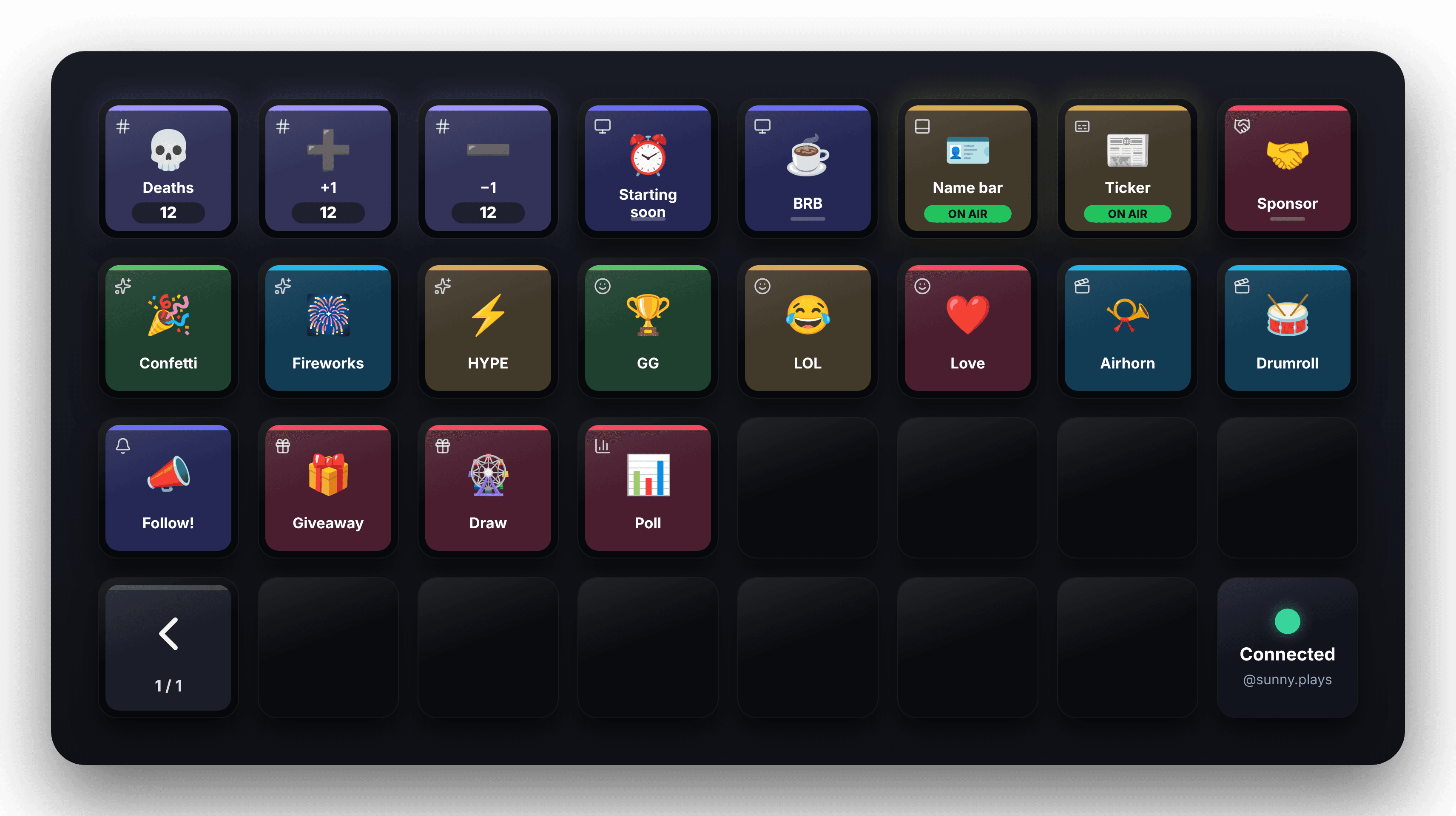
The other half of a stream is made of moments you decide. You died again. You are going on break. You are reading the sponsor code. The raid just landed and you want the room to feel it. None of those come from an event; they come from you, and they need a button. That is what Kloot is: one browser source in OBS, and a deck of keys you press from your phone, a browser tab or a Stream Deck.
- Counters for deaths, wins or anything else, bumped from your phone without leaving the game.
- Screens for Starting Soon, Be Right Back and Ending, with a countdown that survives a refresh.
- Lower thirds with your name and what you are playing, on and off with one press.
- A ticker for the schedule, the socials or tonight’s goal.
- Sponsor banners with a code callout you fire as you say it.
- Effects and sounds: confetti, emoji bursts and a library of sounds you press to play.
- Giveaways and polls your viewers join by scanning a QR code or typing a short join code, on any platform.
Because Kloot never reads chat, its giveaways and polls do not depend on it either. A viewer scans the code on screen and enters from their phone, which is also why the same draw works whether they are watching on Twitch, YouTube, Kick or a TV with no chat open.


Run both, and move what you press
There is no switch-over day in this plan. You add one source, move one thing, and see whether it earns its place.
- Leave StreamElements exactly as it is. Do not delete an overlay or a widget yet.
- Make a Kloot account and add its overlay URL to OBS as one browser source, the size of your canvas, above your StreamElements sources.
- Pick one thing you currently do by hand: a death count you edit in a text label, or a Be Right Back scene you switch to with the mouse. Build it in Kloot.
- Open the Kloot deck on your phone, prop it beside the keyboard, and stream as normal. Press the key when the moment comes.
- After a stream or two, decide. If it earned its place, hide the old version so two things are not drawn in the same spot. If it did not, remove the Kloot key and nothing else has changed.
- Move the next pressed thing the same way, one at a time. Leave alerts, tips, goals and chat where they are.
The order in OBS matters a little. Put the Kloot source above the StreamElements ones, so a full-screen Be Right Back covers everything underneath it, and check that a Kloot lower third does not sit on top of your alertbox. Both tools let you move their pieces, so this is a five-minute job, not a redesign.
Kloot’s free plan has no clock and asks for no card. It runs one live counter, the screens with their countdowns, two giveaways and two polls a month, and most of the sound library, which is enough to run the whole trial above on a real stream. Pro adds more of everything, sponsor banners and the Stream Deck integration.
When you should not bother
If everything on your stream is driven by chat and events, and you never find yourself alt-tabbing to change something by hand, Kloot has little to add. The same is true if your one worry this year was SE.Pay: that is a payments question, StreamElements has already said what replaces it, and no overlay tool changes the answer.