Overlays for art, music and IRL streams

Your hands are busy. Run the overlays from your phone.

When you are painting, playing or cooking, the keyboard is out of reach. Your deck opens in your phone’s browser, so your name card, the ticker, a heart rain and Be Right Back are one tap away.

Try it in a browser — Free

Joined by streamers from 60+ countries. Try it with no account and no download.

Your deck · your stream

These are the real deck keys and the real overlays. Press one.

countries
60+

countries

counter bumps and key presses
12,000+

counter bumps and key presses

hours streamed with Kloot
500+

hours streamed with Kloot

What overlays does an art or music stream need?

Your name and what you are making today, a line for your socials or the track that is playing, a warm way to thank people, and a screen for when you step away. In Kloot each is a key on a deck that runs on your phone, so you never put down the brush to change them.

One session, start to finish

Run a whole session from your phone

You press Starting Soon. A Starting Soon card with a countdown.

Run of show

Built for creative streams

Set it up once, press it every session

How do I put my name and today’s project on screen?

Use a lower third with your name and what you are making. One key shows it, and a second press clears it.

  • Change the line between pieces in your panel.
  • It sits low in the frame, clear of your canvas.
  • Free includes it.

In your panel

On your stream

How do I show my socials or the song that is playing?

Put them in a ticker along the bottom. It loops on its own, and you can change a line from your phone when the track changes.

  • Up to ten lines, in your colours.
  • One key turns it on and off.
  • Free includes one ticker.

In your panel

On your stream

How do I thank viewers without stopping?

Press the heart rain on your phone. Hearts fall down the frame for a moment, then clear themselves.

  • Confetti and other emoji rains sit beside it on the deck.
  • One tap, nothing to set up.
  • Free on every plan.

In your panel

On your stream

Two minutes

How do I add creative stream overlays to OBS?

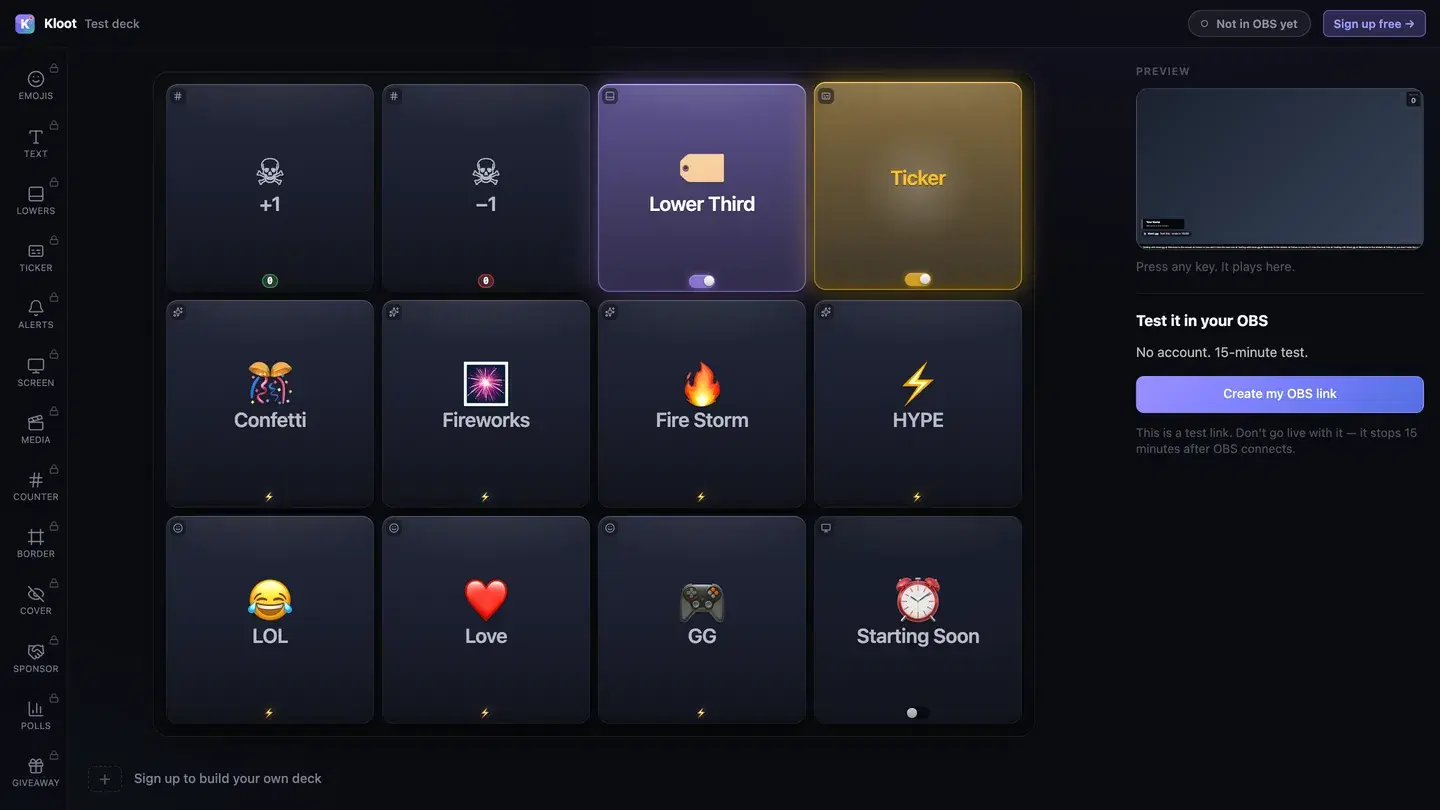
The Kloot test deck at /try: twelve keys in the middle, with Lower Third and Ticker switched on, a live preview of the stream on the right and a button that makes a link for OBS.
The free test deck at kloot.gg/try, exactly as it looks. Your own deck holds the keys you choose.

OBS · Browser source

URLhttps://kloot.gg/overlay/u/your-linkWidth1920Height1080
  1. 1

    Open the deck

    Open your deck in a browser. You can try it with no account.

  2. 2

    Add one Browser source

    In OBS, add a Browser source, paste your Kloot overlay link, and set it to 1920 × 1080.

  3. 3

    Press keys

    Press keys from the deck on your PC or your phone. Each one goes straight to your stream.

Hands free of OBS

Can I run it from my phone?

Yes. Your deck opens in your phone’s browser, so OBS, your guests and the conversation stay where they are. Nothing to install.

Control your stream from your phone

Your phone is the deck

KKloot LIVE
Full panel layout · auto-switches

Your stream reacts

LIVE👁 1,248
Poll opened

What should we play next?

Valorant
4242%
42%
Fortnite
3131%
31%
CS2
2727%
27%
Scan to vote
KLOOT
kloot.gg/join
The real overlay renderers — exactly what lands in your OBS

Screens library

Templates for creative streams

🧶 WoolFree

Warm oat and soft brown, handwritten.

Use this template
🕯️ CandlelightPro

A low flame just out of frame.

Suits soft piano: add your own track

Use this template
💿 VinylFree

Matte black with a warm cream label.

Use this template
🎻 Practice RoomPro

Slow bands of light over a quiet room.

Use this template

Ways to run it

What does a creative stream setup look like?

Example setup

A painting stream

One piece a session, mostly quiet.

  • Name card
  • Topic ticker
  • Love
  • Be Right Back

The phone sits on the easel shelf, and the name card changes with each new piece.

Runs on Free

Example setup

A live music session

Covers and requests from the room.

  • Starting Soon
  • Topic ticker
  • Love
  • Ending card

The ticker carries the set list, and hearts rain when a request comes in.

Runs on Free

Plans

What does this setup cost?

Free

$0

forever

Covers

  • Starting Soon screen
  • name card
  • topic ticker
  • heart rain
  • Be Right Back screen with a countdown
  • ending card

Event Pass · $5 · 48 hours of everything in Pro

One payment, no subscription.

See the Event Pass →

Everything on this page runs on Free. See full pricing

Without Kloot

Kloot vs. doing it by hand in OBS

JobBy handWith Kloot
Changing an overlayWalking back to the keyboardA tap on your phone
Your name and projectA text source typed before you startA name card you change from your panel
Socials and the trackA still image of your linksA ticker that loops by itself
Stepping awayA BRB scene switched by handA Be Right Back screen with a countdown
In OBSA source for every widgetOne Browser source for all of it

What Kloot doesn’t do

It never reads your chat, never switches your OBS scenes, and doesn’t detect anything on its own. Every change on screen is a key you, or someone you gave a link to, pressed.

Works alongside the tools you already stream with

OBS StudioStreamlabsTwitchYouTubeKick

Questions

Can I run my overlays from my phone?

Yes. Your deck opens in your phone’s browser, the same signed-in deck rather than an app, so you can change overlays without leaving your easel, instrument or stove.

Control your stream from your phone

How do I put my name on screen?

Use a lower third with your name and today’s project, and press its key to show or clear it. Lower thirds are on Free.

Add a lower third to your stream

How do I show what song is playing?

Put the track in a ticker line and change it from your phone when the song changes. The ticker loops on its own along the bottom.

Add a scrolling ticker to your stream

How do I add a heart rain to my stream?

Put the Love key on your deck and tap it. Hearts fall down the frame and clear themselves. Effects are free on every plan.

Add emoji reactions & hype effects to your stream

Does it work for IRL streams away from a computer?

The overlay is a Browser source, so it needs OBS or Streamlabs Desktop running somewhere, at home or on a cloud machine. The deck itself works from your phone wherever you are.

Does it work with Streamlabs as well as OBS?

Yes. Everything on this page is one overlay link. Add it as a Browser source at 1920 × 1080 in OBS or in Streamlabs Desktop.

Which plan do I need?

Free covers the Starting Soon screen, name card, topic ticker, heart rain, Be Right Back screen with a countdown and ending card.

90 seconds from now,
confetti hits your stream.

Sign in → paste one URL → press a button. That’s it. Your viewers will notice the difference tonight.

Free forever · Pro $9/month or $79/year · Event Pass $5 for 48 hours · Prices + applicable taxes