Fitness stream overlays for OBS

The round is on screen, so nobody has to ask how long is left.

Following along with a workout is hard enough without counting in your head. An interval screen holds the round, the rest and the cue, so the person on the mat can look up once and know where they are.

Try it in a browser — Free

Joined by streamers from 60+ countries. Try it with no account and no download.

Your deck · your stream

These are the real deck keys and the real overlays. Press one.

countries
60+

countries

counter bumps and key presses
12,000+

counter bumps and key presses

hours streamed with Kloot
500+

hours streamed with Kloot

What overlay does a fitness stream need?

An interval timer that alternates work and rest rounds on screen with the current cue, a rep counter you can bump from your phone, and a short break countdown. Viewers are following along rather than watching, so the screen has to answer "how long is left" for them.

One class, start to finish

Run a whole class from one deck

You press Starting Soon. A countdown to the first round.

Run of show

Built for fitness streams

Set it up once, press it every class

How do I put a work and rest timer on a fitness stream?

Make a screen in Intervals mode. Set the work and rest lengths and the number of rounds, and press its key when the set starts. It counts each one down and moves on by itself.

  • The round number is on screen, so nobody loses count.
  • Rotating lines under the clock carry your cues as the round goes on.
  • On Creator.

In your panel

On your stream

How do I count reps on stream without stopping?

Make a counter labelled Reps with a +1 key. Open your deck on your phone, put it by the mat, and tap between reps.

  • Your deck runs in your phone’s browser. There is nothing to install.
  • One Reset key starts the next set from zero.
  • Free includes one counter.

In your panel

On your stream

How do I bring everyone back after a break?

Make a full-screen countdown and press it when the break starts. Everyone watches the same minute run out.

  • Set the length once; one key starts it every time.
  • At zero it can hide itself, so the class is back on camera.
  • Free includes it.
Screens · FreeSee Screens

In your panel

On your stream

Two minutes

How do I add fitness stream overlays to OBS?

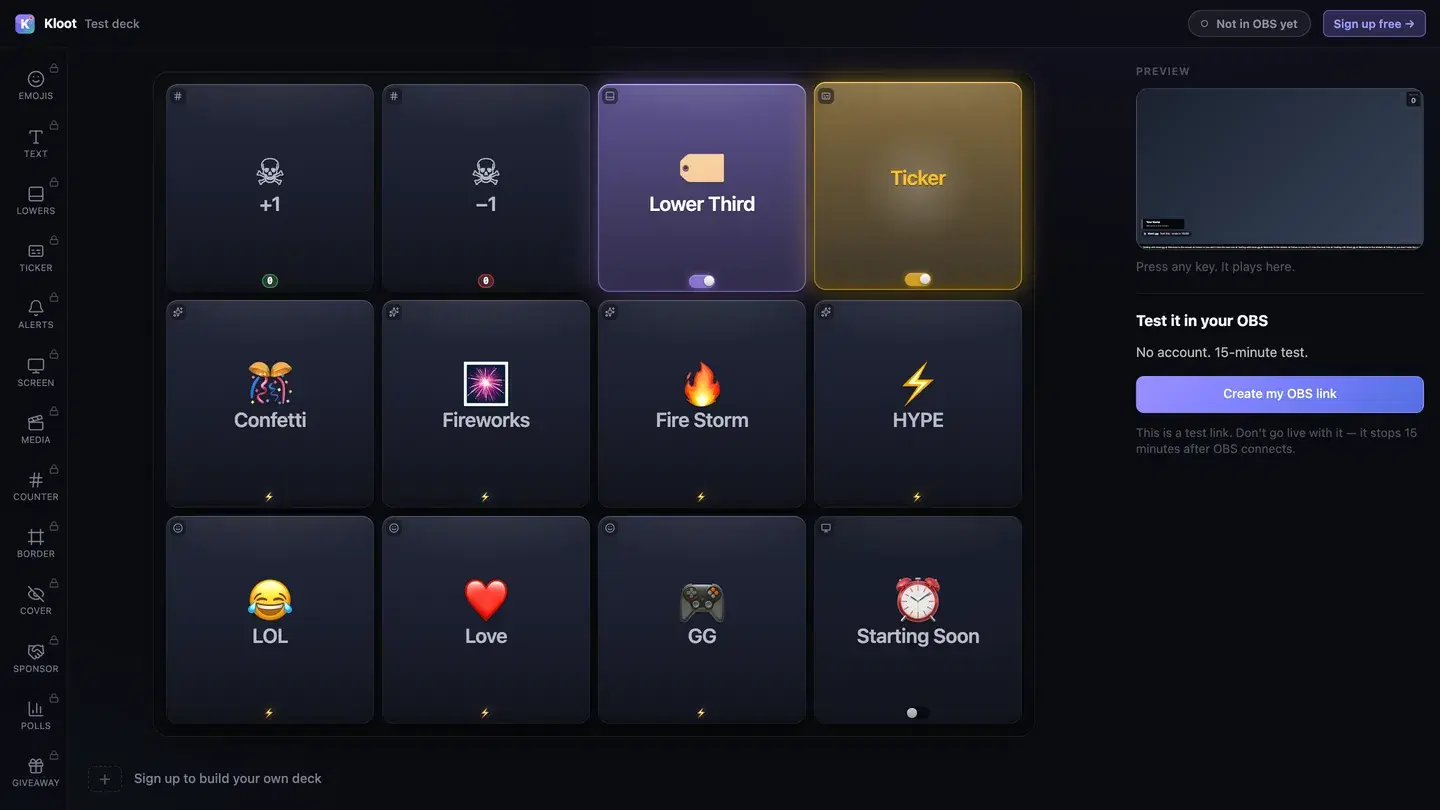
The Kloot test deck at /try: twelve keys in the middle, with Lower Third and Ticker switched on, a live preview of the stream on the right and a button that makes a link for OBS.
The free test deck at kloot.gg/try, exactly as it looks. Your own deck holds the keys you choose.

OBS · Browser source

URLhttps://kloot.gg/overlay/u/your-linkWidth1920Height1080
  1. 1

    Open the deck

    Open your deck in a browser. You can try it with no account.

  2. 2

    Add one Browser source

    In OBS, add a Browser source, paste your Kloot overlay link, and set it to 1920 × 1080.

  3. 3

    Press keys

    Press keys from the deck on your PC or your phone. Each one goes straight to your stream.

Hands free of OBS

Can I run it from my phone?

Yes. Your deck opens in your phone’s browser, so OBS, your guests and the conversation stay where they are. Nothing to install.

Control your stream from your phone

Your phone is the deck

KKloot LIVE
Full panel layout · auto-switches

Your stream reacts

LIVE👁 1,248
Poll opened

What should we play next?

Valorant
4242%
42%
Fortnite
3131%
31%
CS2
2727%
27%
Scan to vote
KLOOT
kloot.gg/join
The real overlay renderers — exactly what lands in your OBS

Ways to run it

What does a fitness stream setup look like?

Example setup

A HIIT class

30 seconds on, 15 off, eight rounds, then a break.

  • Starting Soon
  • Interval
  • Water break
  • Ending card

The interval screen runs the rounds. The instructor only presses Water break between sets.

Runs on Creator

Example setup

A strength session

Sets of slow reps, coached on camera.

  • Rep +1
  • Water break
  • Ending card

Reps go up from a phone on the floor beside the mat, and Reset starts each set.

Runs on Free

Plans

What does this setup cost?

Free

$0

forever

Covers

  • Starting Soon screen
  • rep counter
  • water-break countdown
  • ending card

Creator

$15/mo

or $8.25/mo billed yearly at $99

Adds

  • interval timer

Everything on this page runs on Creator. See full pricing

Without Kloot

Kloot vs. doing it by hand in OBS

JobBy handWith Kloot
Work and restA phone timer the camera cannot seeWork, rest and rounds on screen, moving on by themselves
CuesShouting the next move over the musicRotating lines under the clock
RepsCounting out loud while you coach+1 from your phone between reps
The breakGuessing when to come backA one-minute countdown everyone can see
In OBSA source for every widgetOne Browser source for all of it

What Kloot doesn’t do

It never reads your chat, never switches your OBS scenes, and doesn’t detect anything on its own. Every change on screen is a key you, or someone you gave a link to, pressed.

Works alongside the tools you already stream with

OBS StudioStreamlabsTwitchYouTubeKick

Questions

How do I add an interval timer to a fitness stream?

Make a screen in Intervals mode: a work length, a rest length and a number of rounds. The screen says which one you are in and counts it down, then moves to the next without anyone touching it. Intervals are on Creator.

Interval timer for a fitness stream

Can I put cues on the screen?

Yes. The interval screen can rotate its coaching lines as the round goes on, rather than leaving one instruction up the whole time.

How do I count reps without stopping?

Open your deck on your phone and press +1 between reps; the counter on stream goes up. It is your own signed-in deck in your phone’s browser, not an app. Free includes one counter.

Control your stream from your phone

How do I add a countdown before class starts?

Turn on a Starting Soon screen with a countdown to the first round, so people know how long they have to get on the mat.

Add a Starting Soon / BRB screen to your stream

Does it work with Streamlabs as well as OBS?

Yes. Everything on this page is one overlay link. Add it as a Browser source at 1920 × 1080 in OBS or in Streamlabs Desktop.

Which plan do I need?

Free covers the Starting Soon screen, rep counter, water-break countdown and ending card. Creator ($15/mo) adds the interval timer.

90 seconds from now,
confetti hits your stream.

Sign in → paste one URL → press a button. That’s it. Your viewers will notice the difference tonight.

Free forever · Creator $99/yr or $15/mo · Pro $149/yr or $25/mo · Event Pass $9 for 3 days